之前写过容器化技术之Linux Namespace 和Docker容器网络浅析,有了相关的了解后,我们再来看Kubernetes 的网络模型会更有体会和深入一点。
本文将介绍Kubernetes 的网络模型,其核心思想的关键部分有以下几个部分组成:
- 每个 Pod 有一个集群内唯一的 IP 地址
- 在 Kubernetes 集群中,每个 Pod 都像一台独立的小机器,拥有自己在整个集群中唯一的 IP。
- 这个 IP 是集群内可见、稳定可用的(Pod 重建后 IP 会变,但 Service 可以解决这个问题)。
- Pod内所有容器共享这个 IP ,因为它们在同一个 Pod 的Network Namespace中,所有Pod的容器间可以通过
localhost互相通信,就像在一台机器上跑多个进程。
✅ 类比:Pod ≈ 虚拟机(有独立 IP),容器 ≈ 这台虚拟机上的进程。
- Pod 之间可以直接通信(无 NAT)
- Pod 网络(也称为集群网络)负责处理 Pod 之间的通信,无论两个 Pod 是在同一个节点,还是在不同节点上,它们都可以直接通过 IP+端口通信。
- Kubernetes 要求底层网络(比如 CNI 插件)实现这种“全连通”模型,不需要做端口映射或 NAT。
🌐 这是 Kubernetes 和传统 Docker 网络最大的区别之一 —— 不再需要
-p 8080:80这种端口映射。
- Service:稳定的访问入口
- Pod 会经常被创建、销毁、重建(比如滚动更新),IP 会变。
- 为了解决“如何稳定访问一组 Pod”的问题,Kubernetes 引入了 Service。
- Service 有固定的 ClusterIP 和 DNS 名称(比如
my-app.default.svc.cluster.local)。 - Service 会自动将流量转发到后端健康的 Pod(通过
EndpointSlice动态维护后端列表)。
- Service 有固定的 ClusterIP 和 DNS 名称(比如
🔁 类似于“反向代理 + 负载均衡器”,但完全由 Kubernetes 自动管理。
- 流量如何被转发?—— kube-proxy 或替代方案
- 每个节点上运行
kube-proxy(默认实现),它会监听 Service 和 EndpointSlice 的变化。 - 当你访问一个 Service IP 时,
kube-proxy会通过iptables、IPVS或 eBPF 等技术,把流量透明地转发到某个后端 Pod。 - 有些高级网络插件(比如 Cilium、Calico)会用自己的代理机制替代
kube-proxy,性能更好。
- 从集群外部访问服务:Ingress / Gateway / LoadBalancer
- LoadBalancer 类型 Service:在云厂商(如 AWS、GCP)上自动创建一个公网 IP 的负载均衡器,把流量引入集群。
- Ingress:更灵活的 HTTP/HTTPS 7 层路由(比如基于域名或路径路由到不同服务)。
- Gateway API:Ingress 的新一代标准,功能更强、更模块化(但还在演进中)。
- 网络安全:NetworkPolicy
- 默认情况下,所有 Pod 可以互相访问。
- 如果你想限制流量(比如“只允许前端 Pod 访问后端 Pod”),就用 NetworkPolicy。
- 但注意:不是所有网络插件都支持 NetworkPolicy(比如 Flannel 默认不支持,Calico、Cilium 支持)。
在早期的容器系统中,不同主机上的容器之间通常没有自动连通性,因此往往需要显式创建容器之间的链接,或将容器端口映射到主机端口,以便让其他主机上的容器能够访问。而在 Kubernetes 中则不需要这样做;Kubernetes 的模型允许从端口分配、命名、服务发现、负载均衡、应用配置和迁移等角度来看,将 Pod 视作类似于虚拟机(VM)或物理主机。
该模型中仅有少部分由 Kubernetes 本身实现。其余部分由 Kubernetes 定义 API,而具体功能则由外部组件提供(其中部分组件是可选的):
容器运行时(CRI):创建 Pod 的网络命名空间
网络插件(CNI):负责 Pod IP、跨节点通信、NetworkPolicy
kube-proxy(或替代品):负责 Service 流量转发
总结来说:Kubernetes 网络的核心哲学是:让所有 Pod 像在同一个局域网里的物理机一样自由通信,同时通过 Service、Ingress、NetworkPolicy 等抽象,提供稳定访问、外部接入和安全控制。
看到一个针对Kubernetes的网络模型很生活化也很形象的类比: 🏙️
- Pod:就像一个办公室,里面可以有一个或多个同事(容器)一起工作,共享办公室空间(Namespace),使用同一个门牌号(IP地址),可以直接面对面交流(通过localhost通信),之间相互协作。
- Service:一个公司前台电话/前台接待,当有人想找”财务部门”时,前台会帮你转接到可用的财务人员(负载均衡),即使财务人员换了办公室,前台依然知道怎么找到他们
- kube-proxy / CNI:道路 + 交通规则
- Ingress / Gateway:大楼入口的门卫:检查外来访客的身份,处理安全检查(SSL/TLS),把外部流量引导到正确的Service(公司的前台)。
- NetworkPolicy:办公室的门禁
Service
Service:将运行在一组Pods上的应用公开为网络服务的抽象方法;即使工作负载被拆分到多个后端,也可以通过一个对外暴露的统一入口点,将集群中运行的应用暴露出来。
Kubernetes Pod是动态创建的,每个Pod都有自己的IP地址,这就导致了一个问题:如果一组Pod依赖集群的另一组Pod提供的功能,那么前端Pod如何找出后端提供服务的Pod呢?
这时,Service 登场了。Kubernetes Service:定义了一个抽象,一种可以访问一组Pod的策略;以此解耦前后端的Pod,后端的Pod发生变化,前端的Pod无须关心,Service的抽象能够解耦这种关联;
Service关联后端Pod的最基本方式是通过Selector标签选择运算符来确定的;Service的选择运算符的控制器会不断扫描标签与之匹配的Pod,然后将所有Pod的的更新发布到对应的EndPoint对象;
所以可以说:Service为云原生应用提供了服务发现和负载均衡的能力。
如果你的工作负载使用 HTTP,你可能会选择使用 Ingress 来控制 Web 流量如何到达该工作负载。Ingress 并不是一种 Service 类型,但它充当了集群的入口点。Ingress 允许你将路由规则整合到一个资源中,从而通过一个统一的监听入口,暴露集群中分别运行的多个工作负载组件。
Kubernetes 的 Gateway API 提供了比 Ingress 和 Service 更强的能力。你可以在集群中添加 Gateway——它是一组通过自定义资源定义(CRD)实现的扩展 API——并使用它们来配置对集群中网络服务的访问。
云原生服务发现
如果你的应用能够使用 Kubernetes API 进行服务发现,你可以向 API Server 查询匹配的 EndpointSlice。当某个 Service 中的 Pod 集合发生变化时,Kubernetes 会自动更新该 Service 对应的 EndpointSlice。
对于非原生应用,Kubernetes 也提供了在应用与后端 Pod 之间放置网络端口或负载均衡器的方式。
无论采用哪种方式,你的工作负载都可以使用这些服务发现机制,找到它希望连接的目标。
Service的创建
如下:声明一个my-service的Service对象,对外监听80端口,它会将请求代理到使用 TCP 端口 9376,并且具有标签 "app=MyApp" 的 Pod 上。
1 | apiVersion: v1 |
上面的manifest会创建一个名为 “my-service” 的新 Service,其类型为默认的 ClusterIP。该 Service 会将流量转发到所有带有 app.kubernetes.io/name: MyApp 标签的 Pod 上的 TCP 9376 端口。
Kubernetes 会为这个 Service 分配一个 IP 地址(即 Cluster IP),该地址由虚拟 IP 机制使用。关于这一机制的更多细节,请参阅 Virtual IPs and Service Proxies。
该 Service 的控制器会持续扫描与其选择器匹配的 Pod,并在需要时对该 Service 对应的 EndpointSlice 集合进行更新。
注意:
Service 可以将任意进入端口映射到一个targetPort。默认情况下、为了方便起见,targetPort会被设置为与port字段相同的值。
我们下面从ServiceSpec的结构定义来看一下Service的一些详细细节。
ServiceSpec结构详解
如下是ServiceSpec的结构定义:
1 | // https://github.com/kubernetes/kubernetes/blob/release-1.34/staging/src/k8s.io/api/core/v1/types.go |
ServicePort
我们看一下Ports的ServicePort的结构:
1 | // ServicePort contains information on service's port. |
Service 的 ports 用于定义 Service 如何对外(或对内)暴露端口,以及这些端口如何映射到后端 Pod 的端口,相关字段的含义:
Name:Service对外暴露的端口的名称,因为一个Service可以暴露多个端口,所需要标识区分;Protocol:对外暴露的端口的支持的协议,支持TCP,UDP,SCTP;这里需要注意的是:同一个端口号不能同时绑定多个协议,如果需要可以定义多个条目来解决;Port:Service 对外暴露的端口,直接对客户端调用使用;TargetPort:后端 Pod 真正接收流量的端口,可以是一个数字端口号,也支持Pod中定义的端口名字;如果不指定,默认和Port字段的值一样;NodePort:只在type: NodePort或LoadBalancer时使用,表示在Node上分配指定的端口来对外提供服务,如果不设置,会随机分配,当然这里有一个端口范围,apiserver的配置;AppProtocol:来声明端口上承载的“应用层协议”,而不仅仅是传输层协议(TCP / UDP)。它是一个 语义提示(hint),主要供 Ingress、Gateway、Service Mesh、负载均衡器 等上层组件使用。不会直接影响 Service 的流量转发。
如下是一个Service的Port示例,通过名字关联Pod的端口:
1 | apiVersion: v1 |
针对Service我们可以同时暴露多个端口,如下,Port的名字必须不一样:
1 | apiVersion: v1 |
Selector
和之前介绍过的Workload Resource的selector含义都是一样的,Service 通过selector定义的一组标签 是来选择后端 的Pod 。selector 的工作原理其实比较简单,Service 创建后:
- Service Controller 持续监控集群中的 Pod;
- 找到 标签匹配 selector 的 Pod;
- 将这些 Pod 的 IP + Port 写入:
EndpointSlice(新机制)(旧版本是 Endpoints); - kube-proxy 根据 EndpointSlice 建立转发规则;
📌 Pod 的 IP 变化、增减、重建,Service 都会自动感知
关于EndpointSlice,我们在下一个章节再解释。
ServiceType
针对应用的某些部分(例如前端),你可能希望将一个 Service 暴露到一个外部 IP 地址上,使其能够从集群外部访问。也有可能只是需要将某个服务暴露一个集群内的IP,仅供集群内部的其他服务访问。
Kubernetes 的 Service 类型(Service types) 允许你指定想要的 Service 访问方式。Service的Type定义如下:
1 | type ServiceType string |
ClusterIP:在集群内部的 IP 地址上暴露 Service。选择该类型会使 Service 只能在集群内部访问。如果你没有显式为 Service 指定type,默认就是ClusterIP。你可以通过 Ingress 或 Gateway 将该 Service 暴露到公网。NodePort:在每个节点(Node)的 IP 地址上的一个静态端口(NodePort)上暴露 Service。为了使 NodePort 可用,Kubernetes 会像创建ClusterIP类型 Service 一样,也同时会为该 Service 设置一个ClusterIP 地址。LoadBalancer:通过一个外部负载均衡器将 Service 暴露到集群外部。 Kubernetes 本身并不直接提供负载均衡组件;你需要自行提供,或者将 Kubernetes 集群与云厂商的负载均衡服务进行集成。- ExternalName:将 Service 映射到
externalName字段指定的内容(例如主机名api.foo.bar.example)。该映射会配置集群的 DNS 服务器返回一个 CNAME 记录,指向该外部主机名。 这种类型 不会设置任何形式的代理或转发。
这里需要注意的很重要的设计:Service API 中的 type 字段采用的是分层(嵌套)功能设计:每一层类型都会在前一层的基础上增加功能,不过,这种分层设计有一个例外:你可以通过禁用 LoadBalancer Service 的 NodePort 分配,来定义一个 LoadBalancer 类型的 Service。
我们该如何理解ServiceType的这个分层嵌套的设计呢?在下一个章节我们再详细展开。
InternalTrafficPolicy
| 字段 | 作用对象 | 控制的是 |
|---|---|---|
.spec.internalTrafficPolicy |
集群内流量 | Pod → Service 的流量如何选后端 |
.spec.externalTrafficPolicy |
集群外流量 | 外部 → Service 的流量如何选后端 |
这两种流量策略的取值定义是一样的,如下:
1 | // https://github.com/kubernetes/kubernetes/blob/release-1.34/staging/src/k8s.io/api/core/v1/types.go |
.spec.internalTrafficPolicy(集群内流量):只影响集群内客户端(Pod、Node、kubelet 等)在请求其他Service 的流量时如何选后端的Pod。
Cluster,默认值:Pod 访问 Service 的 ClusterIP,流量可以被转发到 集群中任意 Node 上的任意就绪 Pod;可以带来最大化负载均衡和最佳可用性,但可能产生跨节点网络流量(跨 AZ 更明显);
1 | Pod A (node-1) |
Local:Pod 访问 Service 的 ClusterIP,只会把流量转发到“本节点(local node)”上的就绪 Pod,如果本节点没有匹配的 Pod:直接丢弃流量,不会 fallback 到其他节点。
1 | Pod A (node-1) |
✔️ 适合 Local 的场景
- DaemonSet(每个节点都有 Pod)
- Node-local 缓存 / Agent
- 想避免 hairpin + 跨节点流量
- 对延迟极度敏感
❌ 不适合 Local 的场景
- 副本数少
- Pod 分布不均
- 强可用要求
ExternalTrafficPolicy
参考上面的InternalTrafficPolicy,.spec.externalTrafficPolicy(集群外流量):只影响集群外部请求Service 的流量如何选后端。仅对 Service 类型NodePort和LoadBalancer生效, 对 ClusterIP 无效。
Cluster,默认值:外部流量进入任意 Node,kube-proxy 可以转发到 任意 Node 上的就绪 Pod,会发生 SNAT;特点是高可用,但是源 IP 丢失
1 | Client |
Local:只会把流量转发到:当前接收流量的 Node 上的 Pod,如果该 Node 上没有 Pod:直接丢弃流量,不做 SNAT。特定是:保留客户端真实 IP,避免多一跳转发,但可用性下降(依赖 Pod 分布)
1 | Client (真实 IP) |
为了避免把流量打到没有 Pod 的节点:云厂商 LB:只会把流量转发到有就绪 Pod 的 Node ,这就是 externalTrafficPolicy: Local 能“安全使用”的前提。
典型组合模式:
1️⃣ DaemonSet + 本地优先
1 | internalTrafficPolicy: Local |
适合:
- Node Exporter
- 日志 / 监控 agent
- 边缘代理
2️⃣ 普通 Web 服务(推荐默认)
1 | internalTrafficPolicy: Cluster |
适合:
- 大多数无状态服务
3️⃣ 保留客户端 IP 的公网服务
1 | externalTrafficPolicy: Local |
常见于:
- WAF
- 日志记录真实来源 IP
- GeoIP
详细的策略策略可以参考官方的Traffic Polices。
TrafficDistribution流量分发
.spec.trafficDistribution 流量分发控制字段提供了另一种方式,用于影响 Kubernetes Service 内部的流量路由。流量策略侧重于严格的语义保证,而流量分发则允许你表达偏好(例如,将流量路由到在拓扑上更接近的 endpoint)。
这有助于在性能、成本或可靠性方面进行优化。在 Kubernetes 1.35 中,支持以下取值:
- PreferSameZone
表示优先将流量路由到与客户端位于同一可用区(zone)的 endpoint。 - PreferSameNode
表示优先将流量路由到与客户端位于同一节点(node)的 endpoint。 - PreferClose(已弃用)
这是PreferSameZone的旧别名,对语义的表达不够清晰。
如果未设置该字段,实现将采用其默认的路由策略。
SessionAffinity会话亲和性
发往 Service 的 IP:Port 的流量会被代理到合适的后端,而客户端无需了解 Kubernetes、Service 或 Pod 的任何细节。
如果你希望来自某个特定客户端的连接每次都被转发到同一个 Pod,可以通过将 Service 的 .spec.sessionAffinity 设置为 ClientIP,基于客户端的 IP 地址来启用会话亲和性(默认值为 None)。
我们可以看一下关于会话亲和性结构的定义如下:
1 | // https://github.com/kubernetes/kubernetes/blob/release-1.34/staging/src/k8s.io/api/core/v1/types.go |
在开启会话保持的设置时,我们还可以通过为 Service 设置 .spec.sessionAffinityConfig.clientIP.timeoutSeconds,来指定会话保持的最大时间(默认值为 10800 秒,即 3 小时)。
注意:
在 Windows 上,Service 不支持设置会话粘性的最大超时时间。
ExternalIPs
如果存在能够路由到一个或多个集群节点的外部 IP,Kubernetes Service 就可以通过这些 externalIPs 对外暴露。当网络流量进入集群时,如果其目标 IP 是该外部 IP,且端口与对应 Service 的端口匹配,Kubernetes 所配置的规则和路由会确保这些流量被转发到该 Service 的某个 endpoint。
在定义 Service 时,你可以为任何类型的 Service 指定 externalIPs。在下面的示例中,名为 my-service 的 Service 可以通过 TCP 协议、使用地址 198.51.100.32:80 被客户端访问(该地址由 .spec.externalIPs[] 和 .spec.ports[].port 组合得出)。
1 | apiVersion: v1 |
注意:
Kubernetes 不会负责 externalIPs 的分配或管理,这些 IP 的分配与路由配置由集群管理员自行负责。它只是告诉 kube-proxy:“如果有流量打到这个 IP:Port,就按这个 Service 的规则转发”
externalIPs 的本质用途是:让 Service 监听一个“已经能路由到集群节点的外部 IP”,并把流量转发到后端 Pod。
比较常见的用途是在早期或传统环境:裸机 / 私有机房(没有云 LB)
- Bare Metal
- 私有 IDC
- 没有 LoadBalancer
- Ingress 尚不成熟
管理员可能已经有:公网 IP,静态路由 / NAT,BGP / VRRP;
Service type
前面介绍ServiceSpec结构的时候简单介绍过Service type的定义和含义,这里我们再详细展开一下,因为这是理解Kubernetes Network很关键的一个API。
ClusterIP
在集群内部的 IP 地址上暴露 Service。选择该类型会使 Service 只能在集群内部访问。如果你没有显式为 Service 指定 type,默认就是 ClusterIP。你可以通过 Ingress 或 Gateway 将该 Service 暴露到公网。
该默认的 Service 类型会从集群为此用途预留的 IP 地址池中分配一个 IP 地址。其他几种 Service 类型均以 ClusterIP 为基础进行构建。
如果你定义的 Service 将 .spec.clusterIP 设置为 "None",Kubernetes 就不会为其分配 IP 地址。这就是所谓的:“无头服务(Headless Services)”,后面会进行介绍;
当然,我们可以将 .spec.clusterIP 设置为自定义 的集群IP 地址。例如,当你希望复用一个已存在的 DNS 记录,或者已有遗留系统被配置为使用特定 IP 地址且难以重新配置时,这一功能就非常有用。你所选择的 IP 地址必须是 API 服务器配置的服务集群 IP 范围(service-cluster-ip-range CIDR)内的有效 IPv4 或 IPv6 地址。如果你尝试创建一个包含无效 clusterIP 地址值的 Service,API 服务器将返回 HTTP 状态码 422,以表明存在问题。
下面是一个显示设置ClusterIP的Service配置示例:
1 | apiVersion: v1 |
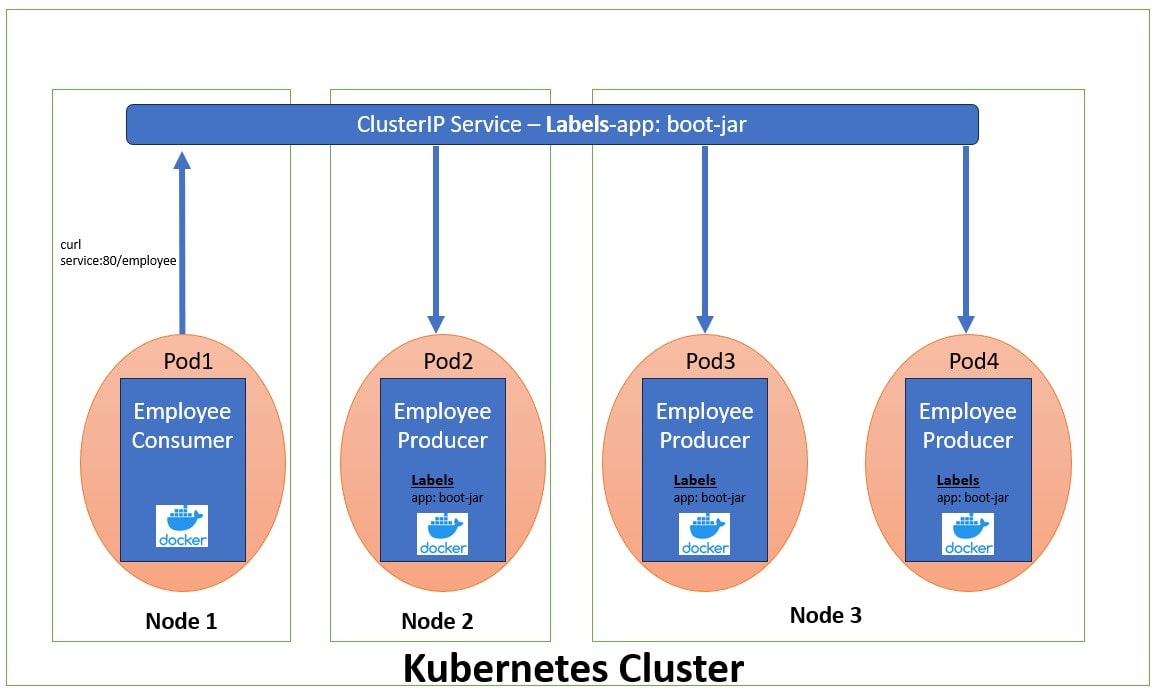
这里引用 Difference between ClusterIP, NodePort and LoadBalancer Service一文中的图来简单的了解一下ClusterIP Service对后端Pod服务的抽象:
NodePort
在每个节点(Node)的 IP 地址上的一个静态端口(NodePort)上暴露 Service。为了使 NodePort 可用,Kubernetes 会像创建 ClusterIP 类型 Service 一样,也同时会为该 Service 设置一个ClusterIP 地址。
如果你将 .spec.type 字段设置为 NodePort,Kubernetes 控制平面会从由 --service-node-port-range 标志指定的端口范围(默认为 30000–32767)中分配一个端口。集群中的每个节点都会在该端口(所有节点使用相同的端口号)上代理流量到你的 Service。分配的端口号会记录在 Service 的 .spec.ports[*].nodePort 字段中。
使用 NodePort 类型的 Service,你可以自由地设置自己的负载均衡解决方案,配置 Kubernetes 尚未完全支持的环境,甚至可以直接暴露一个或多个节点的 IP 地址。
对于 NodePort 类型的 Service,集群中的每个节点都会在该端口上监听,并将流量转发到与该 Service 关联的、处于就绪状态的某个 Endpoint。你可以从集群外部通过任意节点的 IP 地址,使用相应的协议(例如 TCP)和分配的端口来访问该 Service。
当然,我们也可以针对NodePort类型的Service,通过spec.ports[*].nodePort字段手动指定对应的Node端口号。控制平面会尝试为你分配该端口;如果该端口已被占用或无效,则 API 请求将失败。这意味着你需要自行避免端口冲突。此外,你指定的端口号必须是有效的,并且必须位于为 NodePort 配置的端口范围内。
以下是一个显式指定 nodePort 值(本例中为 30007)的 NodePort 类型 Service 示例清单:
1 | apiVersion: v1 |
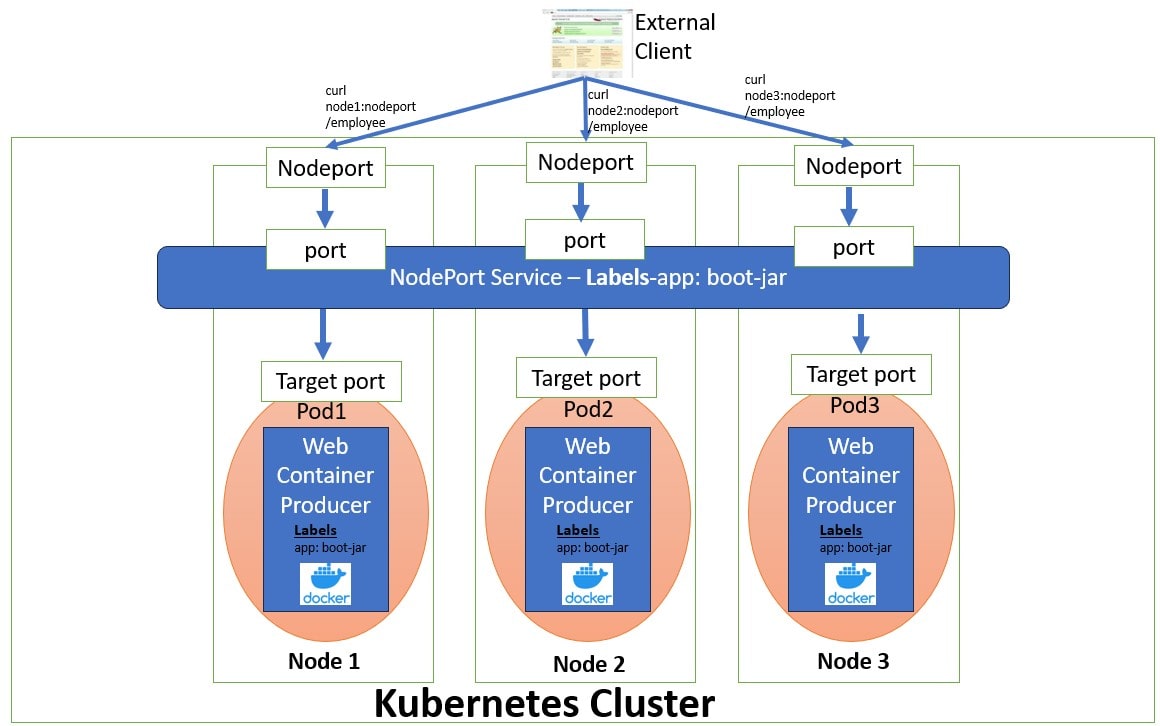
这里引用 Difference between ClusterIP, NodePort and LoadBalancer Service一文中的图来简单的了解一下NodePort Service到后端Pod服务的请求模型,这里相比上一节ClusterIP的Service的请求模型更加详尽一点,展示了四层端口流量的转发,其实从逻辑上Service的Port是一个,但是在各个Node的转发策略上都会有Service Port相关的配置,所以这么画算是真是的实现。
预留端口范围以避免冲突
NodePort 服务的端口分配策略同时适用于自动分配和手动分配场景。当用户希望创建一个使用特定端口的 NodePort Service 时,该端口可能与已分配的其他端口发生冲突。为避免此类问题,NodePort 的端口范围被划分为两个区间(bands):
- 动态分配 默认使用高区间;
- 当高区间耗尽后,才会使用低区间;
- 用户可手动从低区间中选择端口,以降低冲突风险。
配置监听指定 IP 地址
你可以配置集群中的Node,使其使用特定的 IP 地址来提供 NodePort 服务。当你每个节点连接到多个网络时(例如:一个网络用于应用流量,另一个用于节点与控制平面之间的通信),这种配置会很有用。可通过以下方式配置:
- 在启动
kube-proxy时设置--nodeport-addresses参数,或 - 在
kube-proxy配置文件中设置对应的nodePortAddresses字段。
该参数接受一个以逗号分隔的 IP 地址块列表(例如 10.0.0.0/8, 192.0.2.0/25),用于指定 kube-proxy 应视为“本地”的 IP 地址范围。
例如,若以 --nodeport-addresses=127.0.0.0/8 启动 kube-proxy,则它只会选择 loopback(回环)接口用于 NodePort 服务。
默认情况下,--nodeport-addresses 为空列表,表示 kube-proxy 应在所有可用的网络接口上监听 NodePort(这也与早期 Kubernetes 版本的行为兼容)。
NodePort的Service 可通过以下两种方式访问:
<NodeIP>:<nodePort>,从集群外部<ClusterIP>:<port>,从集群内部
LoadBalancer
我们可以在支持外部负载均衡器的云提供商上,将 type 字段设置为 LoadBalancer 会为我们的 Service 申请(创建)一个负载均衡器将 Service 暴露到集群外部。 负载均衡器的实际创建是异步进行的,已创建负载均衡器的信息会发布在 Service 的 .status.loadBalancer 字段中。例如:
1 | apiVersion: v1 |
来自外部负载均衡器的流量会被转发到后端 Pods。具体如何进行负载均衡由云提供商决定。
为了实现 type: LoadBalancer 的 Service,Kubernetes 通常会先执行与创建 type: NodePort Service 等效的操作。随后,cloud-controller-manager 组件会配置外部负载均衡器,将流量转发到分配好的 NodePort 上。
如果云提供商的实现支持,你也可以配置LoadBalancer Service 不分配 NodePort,这种流量直通的方式,以后再介绍。
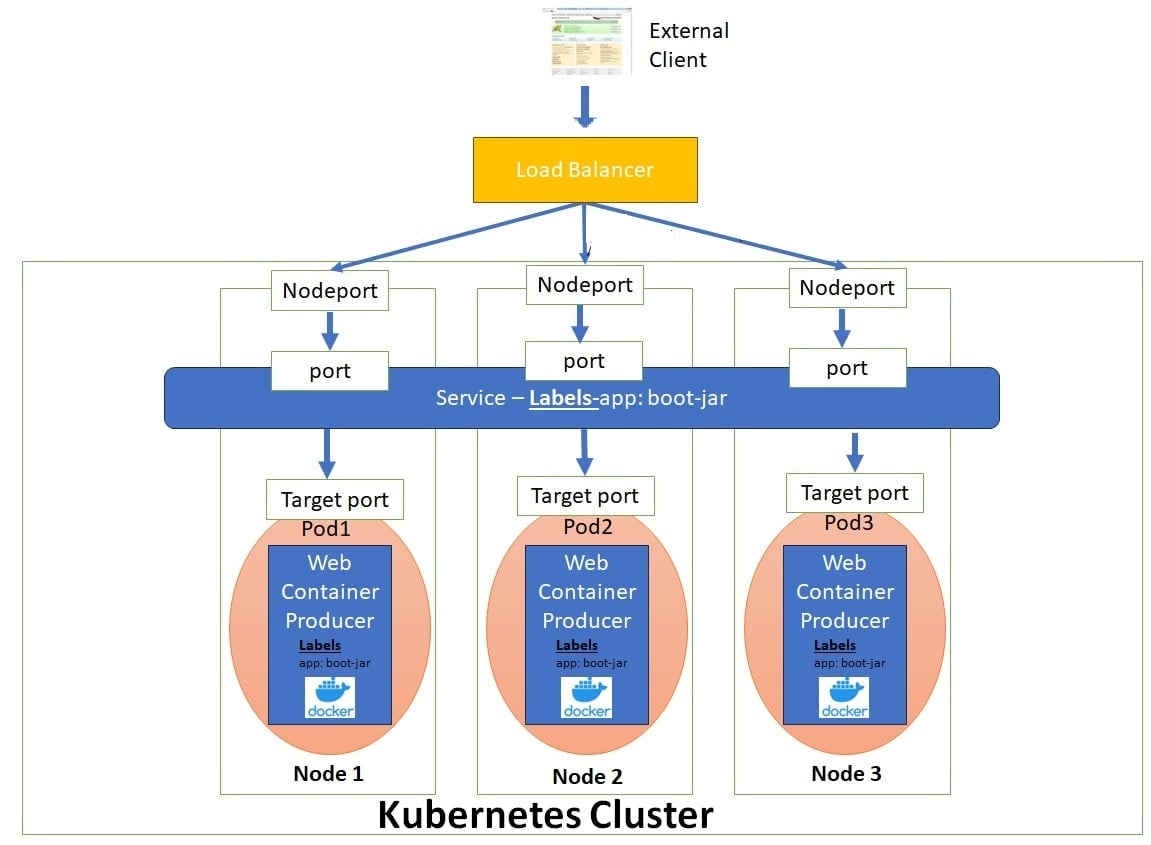
这里引用 Difference between ClusterIP, NodePort and LoadBalancer Service一文中的图来简单的了解一下LoadBalancer Service到后端Pod服务的请求模型。我们可以看到基于分层的设计,流量从外部的Load Balancer到Node的NodePort,然后到Service的Port,最终转发到具体的Pod上,后面我们会详细介绍一下这个分层设计。
LoadBalancerIP
一些云提供商允许你指定 loadBalancerIP。在这种情况下,负载均衡器会使用用户指定的 loadBalancerIP 创建。如果未指定 loadBalancerIP,负载均衡器会使用一个临时(ephemeral)IP 地址。 如果你指定了 loadBalancerIP,但云提供商不支持该特性,那么你设置的 loadBalancerIP 字段会被忽略。
Service 的
.spec.loadBalancerIP字段在 Kubernetes v1.24 中已被弃用。
该字段的定义不够明确,在不同实现中的含义也不同,并且无法支持双栈(dual-stack)网络。该字段可能会在未来的 API 版本中被移除。
如果你正在与某个支持通过(云厂商特定)注解来指定 Service 负载均衡 IP 地址的提供商集成,你应该改为使用这种方式,而不是通过LoadBalanceIP来配置。
如果你正在编写与 Kubernetes 集成的负载均衡器代码,请避免使用该字段。你可以选择与 Gateway 集成,而不是 Service;或者在 Service 上定义你自己的(云厂商特定)注解来指定等效信息。
节点存活状态对负载均衡流量的影响
负载均衡器的健康检查对现代应用至关重要。它们用于判断负载均衡器应将流量分发到哪个服务器(虚拟机或 IP 地址)。
Kubernetes API 并未定义 Kubernetes 管理的负载均衡器必须如何实现健康检查,而是由云提供商(以及集成实现者)自行决定具体行为。
在支持 Service 的 externalTrafficPolicy 字段时,负载均衡器的健康检查被大量使用。
支持多协议的负载均衡器
特性状态:Kubernetes v1.26 [稳定](默认启用)
默认情况下,对于 LoadBalancer 类型的 Service,当定义了多个端口时,所有端口必须使用相同的协议,并且该协议必须是云提供商支持的。
特性开关 MixedProtocolLBService(从 v1.24 起在 kube-apiserver 中默认启用)允许 LoadBalancer 类型的 Service 在定义多个端口时使用不同的协议。
可用于负载均衡 Service 的协议集合由你的云提供商定义,他们可能会施加 Kubernetes API 之外的额外限制。
禁用 LoadBalancer 的 NodePort 分配
特性状态:Kubernetes v1.24 [稳定]
你可以通过将 spec.allocateLoadBalancerNodePorts 设置为 false,来可选地禁用 type: LoadBalancer Service 的 NodePort 分配。
这仅应在负载均衡器直接将流量路由到 Pod,而不是通过 NodePort 的实现中使用。
默认情况下,spec.allocateLoadBalancerNodePorts 为 true,LoadBalancer 类型的 Service 仍然会分配 NodePort。
如果你在一个已经分配了 NodePort 的 Service 上将该字段设置为 false,这些 NodePort 不会被自动释放。你必须显式地从每个 Service 端口中移除 nodePorts 条目,才能释放这些 NodePort。
指定负载均衡器实现的类别
特性状态:Kubernetes v1.24 [稳定]
对于 type: LoadBalancer 的 Service,.spec.loadBalancerClass 字段允许你使用非云提供商默认实现的负载均衡器。
默认情况下,.spec.loadBalancerClass 未设置。如果集群使用 --cloud-provider 参数配置了云提供商,那么 LoadBalancer 类型的 Service 会使用云提供商的默认负载均衡器实现。
如果你设置了 .spec.loadBalancerClass,则假定存在一个与该 class 匹配的负载均衡器实现正在监听这些 Service。任何默认的负载均衡器实现(例如云提供商提供的实现)都会忽略设置了该字段的 Service。
spec.loadBalancerClass 只能设置在 LoadBalancer 类型的 Service 上,并且一旦设置便不可更改。
spec.loadBalancerClass 的值必须是标签风格(label-style)的标识符,可以带有前缀,例如 "internal-vip" 或 "example.com/internal-vip"。不带前缀的名称保留给最终用户使用。
负载均衡器 IP 地址模式
对于 type: LoadBalancer 的 Service,控制器可以设置 .status.loadBalancer.ingress.ipMode。
.status.loadBalancer.ingress.ipMode 用于指定负载均衡 IP 的行为方式。该字段只能在同时指定了 .status.loadBalancer.ingress.ip 时设置。
可能的取值有两个:
"VIP"(默认):流量被发送到节点,目标地址仍然是负载均衡器的 IP 和端口。"Proxy": 根据云提供商负载均衡器的流量转发方式,分为两种情况:- 流量先到达节点,再通过 DNAT 转发到 Pod:目标地址为节点的 IP 和 NodePort;
- 流量直接发送到 Pod:目标地址为 Pod 的 IP 和端口。
Service 的实现可以使用这些信息来调整流量路由策略。
ExternalName
ExternalName 类型的 Service 用于将一个 Service 映射到一个 DNS 名称,而不是映射到常见的 selector(例如 my-service 或 cassandra)。你可以通过 spec.externalName 参数来指定这类 Service。
例如,下面这个 Service 定义将 prod 命名空间中的 my-service Service 映射到 my.database.example.com:
1 | apiVersion: v1 |
ExternalName 类型的 Service 可以接受一个 IPv4 地址形式的字符串,但 Kubernetes 会将该字符串当作由数字组成的 DNS 名称来处理,而不是当作 IP 地址(不过,互联网的 DNS 实际上并不允许这种名称存在)。因此,看起来像 IPv4 地址的 externalName 无法被 DNS 服务器解析。
如果你希望将一个 Service 直接映射到某个具体的 IP 地址,可以考虑使用 headless Service(无头 Service)。
当解析主机名 my-service.prod.svc.cluster.local 时,集群的 DNS Service 会返回一条 CNAME 记录,其值为 my.database.example.com。访问 my-service 的方式与访问其他 Service 类似,但有一个关键区别: 重定向是在 DNS 层完成的,而不是通过代理或流量转发来实现的。
如果你之后决定将数据库迁移到集群内部,只需启动相应的 Pods,添加合适的 selector 或 endpoints,并修改该 Service 的类型即可。
警告:在某些常见协议(包括 HTTP 和 HTTPS)下使用 ExternalName 可能会遇到问题。当你使用 ExternalName 时,集群内客户端使用的主机名,与 ExternalName 所指向的主机名是不同的。对于依赖主机名的协议,这种差异可能会导致错误或不可预期的响应:
- HTTP 请求中的
Host:头部,可能是源服务器无法识别的值; - TLS 服务器无法提供与客户端连接时所使用主机名相匹配的证书。
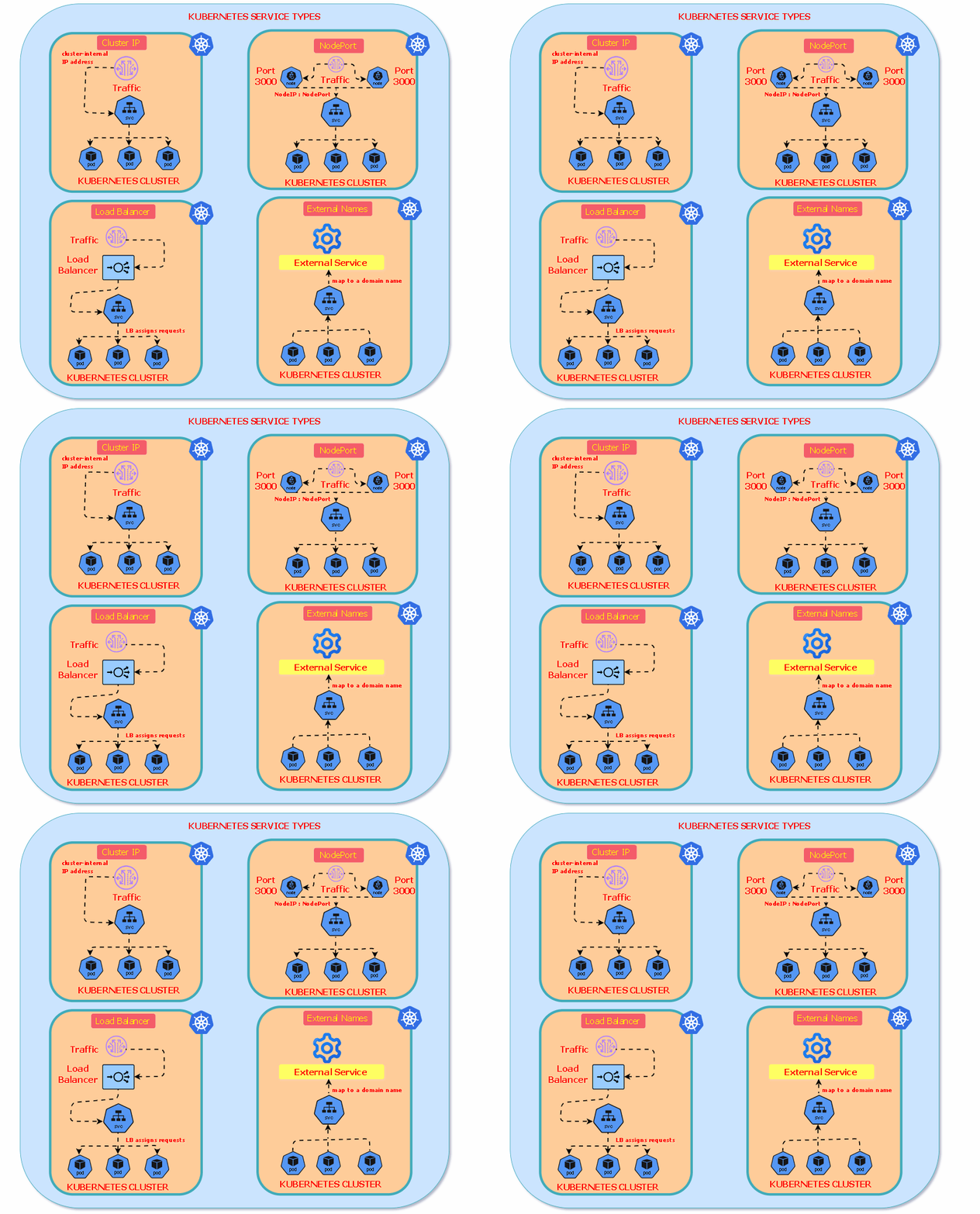
下图是引用自Understanding Kubernetes Service Types,简单的画出了各个Service Type的流量,这里Load Balancer没有画出经过NodePort的请求模型,其实不太容易理解,但是Load Balancer支持直通Pod的模式,所以也不能说不对。
Service的分层设计
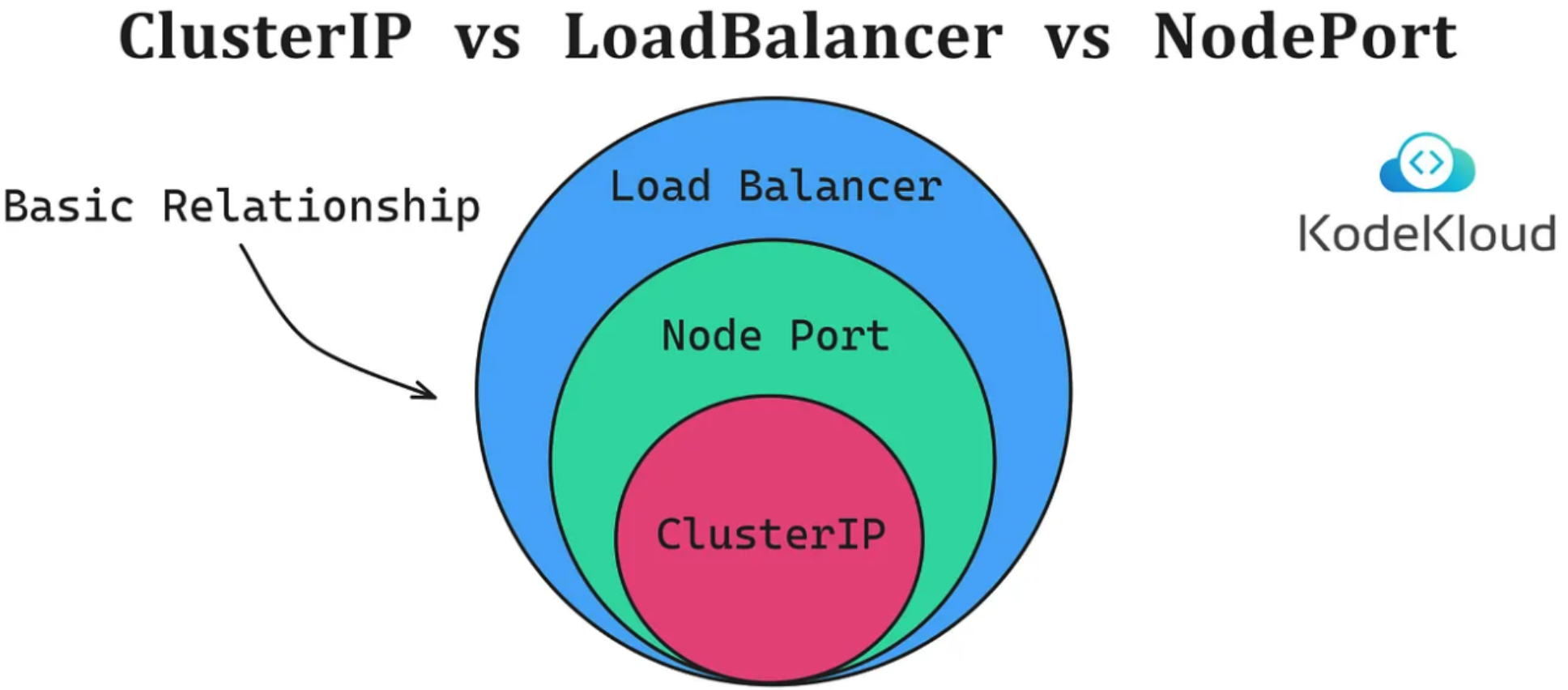
前面在介绍ServiceSpec结构的ServiceType的时候,了解到Service很重要的设计:Service API 中的 type 字段采用的是分层(嵌套)功能设计:每一层类型都会在前一层的基础上增加功能,我们该如何理解ServiceType的这个分层嵌套的设计呢?
其实前面介绍ClusterIP,NodePort,LoadBalancer三种Service的时候,我们已经了解他们的请求转发模型了。
- ClusterIP Service(基础层):分配一个集群内部的虚拟IP (ClusterIP),特点是只能在集群内部访问,提供基础的服务发现和负载均衡。
- NodePort Service(在ClusterIP基础上扩展):在每个Node上开放一个端口(nodePort),可以通过
<NodeIP>:<NodePort>从集群外部访问,保留了ClusterIP的所有规则,只是额外在每个节点上监听NodePort,所以这里可以看到,底层完全复用ClusterIP的实现,从程序的角度是一个扩展性很好的设计,通过组合来进行功能的增加。 - LoadBalancer Service(在NodePort基础上扩展):自动创建云平台的外部负载均衡器(如AWS ELB、GCP Load Balancer) ,提供一个稳定的外部IP地址,保留ClusterIP和NodePort的所有功能,流量可以从NodePort的端口进入进群内部,完全复用了下面两层Service的功能。这里我们先不考虑LB流量直通Pod的模式;
即使使用LoadBalancer你仍然可以:
- 通过ClusterIP在集群内访问 ;
- 通过NodePort直接访问节点;
- 通过LoadBalancer IP访问;
如下是引用Kubernetes Service Types: LoadBalancer, NodePort, and ClusterIP的分层图示:
EndpointSlice
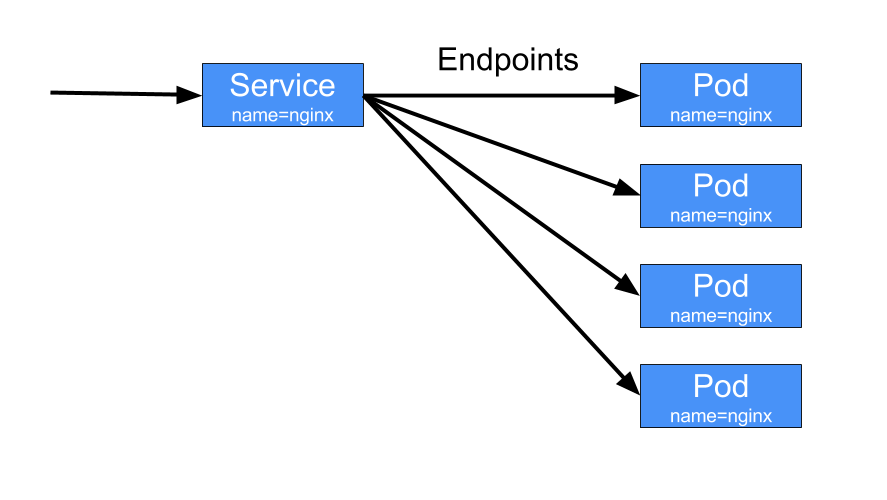
EndpointSlice API 是 Kubernetes 用来让你的 Service 扩展到处理大量后端的机制,并允许集群高效地更新其健康的后端列表。
特性状态: Kubernetes v1.21 [稳定]
EndpointSlices 跟踪后端端点的 IP 地址。EndpointSlices 通常在Service 创建的时候自动创建,后端端点通常代表 Pods。
在 Kubernetes 中,EndpointSlice 包含一组网络端点的引用。控制平面会自动为任何指定了 selector 的 Kubernetes Service 创建 EndpointSlices。这些 EndpointSlices 包含对所有匹配该 Service selector 的 Pods 的引用。EndpointSlices 根据 IP 家族、协议、端口号和 Service 名称的唯一组合来将网络端点分组。EndpointSlice 对象的名称必须是有效的 DNS 子域名。
默认情况下,控制平面会创建和管理每个 EndpointSlice,最多包含 100 个端点。你可以通过设置 --max-endpoints-per-slice 参数来调整此配置,最多可以设置为 1000 个端点。
如果某个 Service 的端点数量过多并达到阈值,Kubernetes 会创建一个新的空 EndpointSlice,并将新的端点信息存储到其中。
EndpointSlices 作为 kube-proxy 路由内部流量的事实来源。当有流量进入 Service 时,kube-proxy 会参考这些 EndpointSlices 来决定如何将流量转发到相应的后端 Pod。其实这么描述不是很准确,在后面介绍kube-proxy时我们会知道:kube-proxy的工作只有在规则变更时,不是在转发时。
1 | // EndpointSlice represents a set of service endpoints. Most EndpointSlices are created by |
参考这里
Services without selectors
Service 最常见的用法是通过 selector 抽象访问 Kubernetes Pod;但当 Service 不使用 selector,并且配合一组对应的 EndpointSlice 对象 时,Service 也可以抽象其他类型的后端,包括 运行在集群外部 的后端。例如:
- 你在生产环境中使用一个外部数据库集群,但在测试环境中使用自建数据库。
- 你希望将 Service 指向 另一个命名空间中的 Service,或者 另一个集群中的服务。
- 你正在将一个工作负载迁移到 Kubernetes。在评估过程中,只有一部分后端运行在 Kubernetes 中。
在这些场景中,你都可以定义一个 不指定 selector 的 Service。例如:
1 | apiVersion: v1 |
由于该 Service 没有 selector,因此不会自动创建对应的 EndpointSlice 对象。你可以通过 手动添加 EndpointSlice 对象,将该 Service 映射到实际运行的网络地址和端口。例如:
1 | apiVersion: discovery.k8s.io/v1 |
自定义 EndpointSlice
当你为某个 Service 创建 EndpointSlice 对象时,可以为 EndpointSlice 使用 任意名称。在同一个命名空间中,每个 EndpointSlice 的名称必须是唯一的。
通过在 EndpointSlice 上设置 kubernetes.io/service-name 标签,你可以将该 EndpointSlice 关联到对应的 Service。前面一节也介绍了,这里需要注意:
- Endpoint 的 IP 地址 不能是:
- 回环地址(IPv4 的
127.0.0.0/8,IPv6 的::1/128) - 链路本地地址(IPv4 的
169.254.0.0/16和224.0.0.0/24,IPv6 的fe80::/64)
- 回环地址(IPv4 的
- Endpoint 的 IP 地址 不能是其他 Kubernetes Service 的 Cluster IP,因为 kube-proxy 不支持将虚拟 IP 作为转发目标。
对于你自己创建的 EndpointSlice(或在自定义代码中创建的),你还应为标签endpointslice.kubernetes.io/managed-by 选择一个合适的值:
- 如果你编写了自己的控制器来管理 EndpointSlice,建议使用类似
my-domain.example/name-of-controller的值。 - 如果使用第三方工具,使用工具名称的小写形式,并将空格和标点替换为短横线(
-)。 - 如果是直接通过
kubectl等工具手动管理 EndpointSlice,可以使用描述人工管理方式的名称,例如staff或cluster-admins。 - 应避免使用保留值 **
controller**,该值用于标识由 Kubernetes 控制平面自身管理的 EndpointSlice。
访问无选择器的 Service
访问一个 没有 selector 的 Service,其方式与有 selector 的 Service 相同。
在前面的示例中,流量会被路由到 EndpointSlice 清单中定义的两个端点之一,即在端口 9376 上建立到 10.1.2.3 或 10.4.5.6 的 TCP 连接。
注意:Kubernetes API Server 不允许代理到未映射到 Pod 的端点。因此,对于没有 selector 的 Service,像下面这样的操作将会失败:
1 | kubectl port-forward service/<service-name> forwardedPort:servicePort |
这是一个安全限制,用于防止 Kubernetes API Server 被用作代理,访问调用者可能无权限访问的端点。
ExternalName Service 是一种特殊情况:它同样 没有 selector,但使用的是 DNS 名称。
Endpoints(已弃用)
特性状态: Kubernetes v1.33 [已弃用]
EndpointSlice API 是对旧版 Endpoints API 的演进。与 EndpointSlice 相比,已弃用的 Endpoints API 存在以下问题:
- 不支持双栈(dual-stack)集群
- 缺少支持新特性(如
trafficDistribution)所需的信息 - 当端点列表过长、无法放入单个对象时,会被截断
因此,建议所有客户端 使用 EndpointSlice API,而不是 Endpoints API。
1 | // https://github.com/kubernetes/kubernetes/blob/release-1.34/staging/src/k8s.io/api/core/v1/types.go |
端点超容量(Over-capacity endpoints)
Kubernetes 对单个 Endpoints 对象中可包含的端点数量有限制。当某个 Service 的后端端点 超过 1000 个 时,Kubernetes 会在 Endpoints 对象中 截断数据。
由于一个 Service 可以关联多个 EndpointSlice,这个 1000 个端点的限制仅影响旧版 Endpoints API。
在这种情况下:
Kubernetes 最多选择 1000 个后端端点 写入 Endpoints 对象
并在 Endpoints 上设置注解:
1
endpoints.kubernetes.io/over-capacity: truncated
当后端 Pod 数量降到 1000 以下时,控制平面会移除该注解
流量仍然会被发送到所有后端,但任何 依赖旧版 Endpoints API 的负载均衡机制,最多只会将流量发送到这 1000 个端点。
同样的 API 限制意味着:你也 无法手动更新一个 Endpoints 对象,使其包含超过 1000 个端点。
Headless Services
有时你并不需要负载均衡和一个单一的 Service IP。在这种情况下,你可以创建所谓的无头(Headless)Service,方法是显式地将集群 IP 地址(.spec.clusterIP)指定为 "None",Headless Service不会分配Cluster IP,kube-proxy 也不会处理这些 Service,平台不会为它们执行任何负载均衡或代理。
这种Headless Service的设计是为了对接其他服务发现机制,而不必绑定到 Kubernetes 自身的实现。
Headless Service允许客户端直接连接到其所偏好的任意 Pod。无头 Service 不会通过虚拟 IP 和代理来配置路由和数据包转发;相反,它们会通过集群的 DNS 服务来暴露后段的所有Pod,通过内部 DNS 记录中返回各个 Pod 的 endpoint IP 地址。
Headless Service的DNS 的自动配置方式取决于 Service 是否定义了 selector(选择器):
- 有 selector 的情况
对于定义了 selector 的无头 Service,endpoints controller 会在 Kubernetes API 中创建 EndpointSlice,并修改 DNS 配置,使其返回直接指向该 Service 后端 Pod 的 A 记录或 AAAA 记录(分别对应 IPv4 或 IPv6 地址)。
- 无 selector 的情况
对于未定义 selector 的无头 Service,控制平面不会创建 EndpointSlice 对象。不过,DNS 系统会查找并配置以下内容之一:
- 对于
type: ExternalName的 Service,创建 DNS CNAME 记录。 - 对于除
ExternalName之外的所有 Service 类型,为 Service 的所有就绪(ready)endpoint 的 IP 地址创建 DNS A / AAAA 记录。
- 对 IPv4 endpoint,DNS 系统创建 A 记录。
- 对 IPv6 endpoint,DNS 系统创建 AAAA 记录。
这里无selector的Endpoints,前面介绍过了,需要手动或由外部控制器维护的。当你定义一个不带 selector 的无头 Service时,port 必须与 targetPort 相匹配。
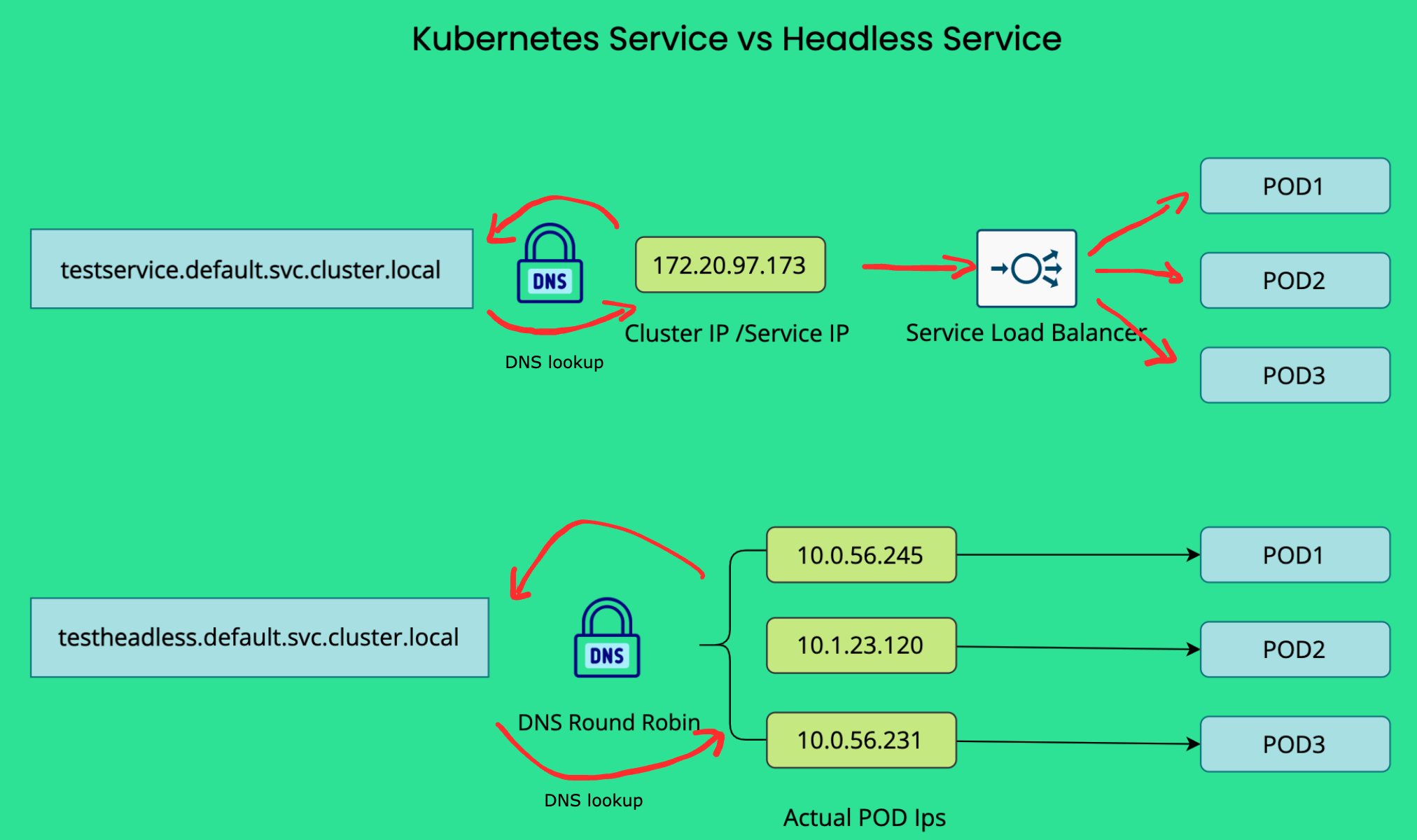
下面是引用Kubernetes Headless Service一文中,可以很清晰的理解关于Service和Headless Service的区别:针对Headless Service DNS lookup会返回所有 Pods 的 endpoint IP,针对普通的 Service (非ExternalName类型)的 DNS lookup返回的是ClusterIP(或对应的虚拟 IP)。
Discovering services
对于运行在集群内部的客户端,Kubernetes 支持两种主要的 Service 发现方式:环境变量 和 DNS。
Environment variables
当一个 Pod 被调度到某个 Node 上运行时,kubelet 会为每一个已存在的(active)Service添加一组环境变量。这些环境变量的格式为 {SVCNAME}_SERVICE_HOST 和 {SVCNAME}_SERVICE_PORT,其中 Service 名称会被转换为大写,并且将短横线(-)替换为下划线(_)。
例如,Service redis-primary 暴露了 TCP 端口 6379,并且被分配了集群 IP 地址 10.0.0.11,那么它会生成如下环境变量:
1 | REDIS_PRIMARY_SERVICE_HOST=10.0.0.11 |
注意:
当你有一个 Pod 需要访问某个 Service,并且你使用环境变量方式向客户端 Pod 发布该 Service 的端口和集群 IP 时,必须在客户端 Pod 创建之前先创建 Service。否则,这些客户端 Pod 的环境变量将不会被注入。
如果你只使用 DNS 来发现 Service 的 ClusterIP,则无需担心这个创建顺序的问题。
Kubernetes 还支持并提供了一组与 Docker Engine 的“传统容器链接(legacy container links)”特性兼容的环境变量。你可以查看 makeLinkVariables 以了解 Kubernetes 是如何实现这一点的。
DNS
你可以(而且几乎总是应该)通过插件(add-on)为你的 Kubernetes 集群配置一个 DNS 服务。
一个具备集群感知能力的 DNS 服务器(例如 CoreDNS)会监听 Kubernetes API 中的新 Service,并为每个 Service 创建一组 DNS 记录。如果在整个集群中启用了 DNS,那么所有 Pod 都应该能够通过 Service 的 DNS 名称自动解析到对应的 Service。
例如,如果你在 Kubernetes 的 my-ns 命名空间中有一个名为 my-service 的 Service,那么控制平面与 DNS 服务协同工作,会为其创建一个 DNS 记录:
1 | my-service.my-ns |
位于
my-ns命名空间中的 Pod,可以直接通过查询my-service来找到该 Service(当然,使用my-service.my-ns也可以)。位于其他命名空间中的 Pod,则必须使用完整限定名
my-service.my-ns。这些名称会解析为该 Service 被分配的 ClusterIP。
Kubernetes 还支持针对命名端口(named ports)的 DNS SRV(Service)记录。如果 my-service.my-ns 这个 Service 定义了一个名为 http、协议为 TCP 的端口,那么你可以通过执行以下 DNS SRV 查询:
1 | _http._tcp.my-service.my-ns |
来发现 http 端口对应的端口号,以及该 Service 的 IP 地址。
如下在我的集群中的测试:
1 | root@nginx-bf5d5cf98-ct79m:/# nslookup wecom-read-it-later |
Kubernetes DNS 服务器也是访问 ExternalName 类型 Service 的唯一方式。
Virtual IPs实现的基石之Service Proxy:kube-proxy
在 Kubernetes 集群中,默认每个节点都会运行一个 kube-proxy(除非你部署了自己的替代组件来取代 kube-proxy)。
kube-proxy 组件负责为 Service实现虚拟 IP(Virtual IP)机制,除 ExternalName Service以外。每一个 kube-proxy 实例都会监听 Kubernetes 控制平面中 Service 和 EndpointSlice 对象的新增与删除。对于每一个 Service,kube-proxy 会(根据其运行模式的不同)调用相应的 API(例如iptables模式,创建iptable规则),配置节点以捕获发往该 Service 的 clusterIP 和端口的流量,并将这些流量重定向到该 Service 的某一个 endpoint(通常是 Pod,也可能是用户提供的任意 IP 地址)。
同时存在一个控制循环,用于确保每个节点上的规则始终与 API Server 中所反映的 Service 和 EndpointSlice 状态保持可靠同步。
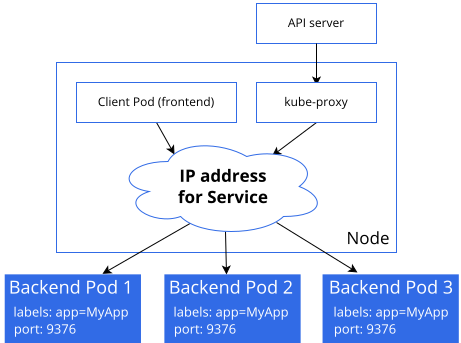
如下是引用Virtual IPs and Service Proxies官方手册中关于kube-proxy的工作位置的图示:某个无状态的图像处理工作负载,其后端 Pod 以 3 个副本运行。这些副本是可互换的(fungible)——前端并不关心具体使用哪一个后端 Pod。
一个经常被提出的问题是:为什么 Kubernetes 依赖代理(proxy)来将入站流量转发到后端?
是否可以采用其他方式?例如,是否可以配置包含多个 A 记录(IPv6 场景下是 AAAA 记录)的 DNS 记录,并依赖 DNS 的轮询(round-robin)解析来实现?
Kubernetes 选择通过代理机制来实现 Service,有以下几个原因:
- DNS 实现长期以来存在**不严格遵守记录 TTL **的问题,常常在记录过期后仍然缓存解析结果。
- 有些应用只在启动时进行一次 DNS 解析,并将结果无限期缓存。
- 即使应用和库能够正确地重新解析 DNS,设置很低甚至为 0 的 DNS TTL 也会给 DNS 系统带来极大的负载,从而变得难以管理。
下面我们会介绍不同 kube-proxy 实现方式的工作原理。总体来说需要注意的是:运行 kube-proxy 时,内核级别的规则可能会被修改(例如创建 iptables 规则),而这些规则在某些情况下只有在重启节点后才会被清理。因此,运行 kube-proxy 应当仅由了解在计算机上运行低层、特权网络代理服务所带来后果的管理员来完成。
iptables代理模式
这种代理模式仅在 Linux 节点上可用。
在该模式下,kube-proxy 使用内核 netfilter 子系统的 iptables API 来配置数据包转发规则。对于每一个 Endpoint,kube-proxy 都会安装相应的 iptables 规则,默认情况下随机选择一个后端 Pod。
集群中所有Node上的 kube-proxy 实例都会观察到Watch新Service 的创建。当某个节点上的 kube-proxy 看到一个新的 Service 时,它会安装一系列 iptables 规则,这些规则会将流量从该虚拟 IP 地址重定向到按 Service 定义的其他 iptables 规则。
这些按 Service 定义的规则会继续链接到每个后端 Endpoint 对应的规则,而每个 Endpoint 规则都会通过目的地址 NAT(DNAT)将流量重定向到对应的后端。
当客户端连接到 Service 的虚拟 IP 地址时,相应的 iptables 规则会生效。kube-proxy 会选择一个后端(基于会话亲和性或随机选择),并将数据包转发到该后端,同时不会重写客户端的 IP 地址。
当流量通过 type: NodePort 的 Service,或者通过负载均衡器进入集群时,也会执行同样的基本流程;不过在这些情况下,客户端 IP 地址会被修改。
优化 iptables模式的性能
在 iptables 模式下,kube-proxy 会为每个 Service 创建若干条 iptables 规则,并为每个 Endpoint IP 地址再创建若干条规则。在拥有成千上万 Pods 和 Services 的集群中,这意味着会存在数以万计的 iptables 规则,当 Services(或其 EndpointSlices)发生变化时,kube-proxy 可能需要较长时间才能将规则更新到内核中。
你可以通过 kube-proxy 配置文件中 iptables 部分的选项来调整同步行为(通过 kube-proxy --config <path> 指定):
1 | ... |
minSyncPeriod
minSyncPeriod 参数用于设置两次尝试将 iptables 规则与内核重新同步之间的最小时间间隔。
如果设置为 0s,那么每当任何 Service 或 EndpointSlice 发生变化时,kube-proxy 都会立即同步规则。这种方式在非常小的集群中运行良好,但在短时间内发生大量变化时,会产生大量重复工作。
例如:如果你有一个 Service,其后端是一个包含 100 个 Pod 的 Deployment,当你删除该 Deployment 时:
- 在
minSyncPeriod: 0s的情况下,kube-proxy 会逐个 Pod 地从 iptables 规则中移除 Endpoint,总共会触发 100 次更新。 - 如果设置了较大的
minSyncPeriod,多个 Pod 删除事件就可以被合并处理,例如只进行 5 次更新,每次移除 20 个 Endpoint。这种方式在 CPU 使用效率上更高,并且可以更快地完成全部变更的同步。
不过,minSyncPeriod 值越大,虽然可以聚合更多变更,但代价是:单个变更可能需要等待最长一个 minSyncPeriod 才会被处理,这意味着 iptables 规则在更长时间内与 API Server 的实际状态不一致。
默认值 1s 在大多数集群中都能很好地工作;但在非常大的集群中,可能需要将其设置为更大的值。特别是当 kube-proxy 的 sync_proxy_rules_duration_seconds 指标显示平均耗时远大于 1 秒时,适当增大 minSyncPeriod 可能会让更新更加高效。
在较老版本的 kube-proxy 中,每次同步都会更新所有 Service 的所有规则,这在大型集群中会导致性能问题(更新延迟),因此当时的推荐做法是设置一个较大的 minSyncPeriod。
从 Kubernetes v1.28 开始,kube-proxy 的 iptables 模式采用了更加精细的更新策略,只在 Service 或 EndpointSlice 实际发生变化时才更新对应规则。
如果你之前手动覆盖了 minSyncPeriod,那么在升级后,建议尝试移除该覆盖配置,让 kube-proxy 使用默认值(1s),或者至少使用一个比之前更小的值。
syncPeriod
syncPeriod 参数用于控制一些与单个 Service 或 EndpointSlice 变化不直接相关的同步操作。尤其是,它决定了 kube-proxy 多快能够发现有外部组件干扰了其 iptables 规则。
在大型集群中,kube-proxy 也只会每隔一个 syncPeriod 执行某些清理操作,以避免不必要的工作。
总体而言,增大 syncPeriod 对性能影响不大。在过去,有时会将其设置为非常大的值(例如 1h),但现在已经不再推荐这样做,因为这样做更可能损害功能性,而不是带来性能收益。
IPVS代理模式
FEATURE STATE:
Kubernetes v1.35 [deprecated]该代理模式仅在 Linux 节点上可用。
在 IPVS 模式下,kube-proxy 使用内核的 IPVS 和 iptables API 来创建规则,将流量从 Service IP 重定向到 Endpoint IP。
IPVS 代理模式基于 netfilter 的 hook 函数,其工作方式与 iptables 模式类似,但底层数据结构使用的是哈希表,并且在内核空间中运行。
IPVS 代理模式最初是一次实验,目标是为 Linux 平台上的 kube-proxy 提供一种:
- 比 iptables 模式更高效的规则同步性能
- 更高的网络流量吞吐能力
虽然在这些目标上取得了成功,但实践表明:内核 IPVS API 与 Kubernetes Service API 的契合度并不理想,因此 IPVS 后端始终无法正确实现 Kubernetes Service 功能中的所有边界场景。
后面介绍的 nftables 代理模式,在设计上基本取代了 iptables 和 IPVS 模式,其性能优于二者,并且推荐作为 IPVS 的替代方案。如果你部署的 Linux 系统版本过旧,无法运行 nftables 代理模式,那么也应优先考虑使用 iptables 模式,而不是 IPVS,因为自 IPVS 模式最初引入以来,iptables 模式的性能已经有了显著提升。
流量调度算法
IPVS 为后端 Pod 提供了多种负载均衡调度策略,包括:
rr(Round Robin,轮询):流量在所有后端服务器之间平均分配。
wrr(Weighted Round Robin,加权轮询):根据服务器权重分配流量,权重高的服务器会接收更多新连接和请求。
lc(Least Connection,最少连接):将更多流量分配给当前活动连接数较少的服务器。
wlc(Weighted Least Connection,加权最少连接):根据“连接数 / 权重”的比值,将流量分配给相对负载较低的服务器。
lblc(Locality-Based Least Connection,基于局部性的最少连接):对来自同一 IP 地址的流量,优先发送到同一个后端服务器(如果该服务器未过载且可用);否则转发到连接数较少的服务器,并在后续继续保持这种分配关系。
lblcr(Locality-Based Least Connection with Replication,带复制的局部性最少连接): 来自同一 IP 的流量优先发送到当前连接数最少的服务器。如果所有后端服务器都过载,则选择一个负载较低的服务器加入目标集合;如果目标集合在指定时间内未发生变化,则移除负载最高的服务器,以避免过度复制。
sh(Source Hashing,源地址哈希):基于源 IP 地址查找静态哈希表,将流量发送到对应的后端服务器。
dh(Destination Hashing,目标地址哈希):基于目标地址查找静态哈希表,将流量发送到对应的后端服务器。
sed(Shortest Expected Delay,最短期望延迟):将流量发送到期望延迟最短的服务器。期望延迟的计算方式为: (C + 1) / U,其中,C 是服务器上的连接数,U 是服务器的固定服务速率(权重)。
nq(Never Queue,不排队):如果存在空闲服务器,则直接将流量发送给空闲服务器,而不是等待更快的服务器;如果所有服务器都繁忙,则退化为 sed 算法。
mh(Maglev Hashing,Maglev 哈希):基于 Google 的 Maglev 哈希算法分配流量。该调度器支持两个标志:
mh-fallback:当选定的服务器不可用时,回退到其他服务器mh-port:在哈希计算中加入源端口号
在使用
mh时,kube-proxy 始终启用mh-port标志,且**不会启用mh-fallback**。在proxy-mode=ipvs下,mh的行为类似于 带端口的源地址哈希(sh)。
这些调度算法通过 kube-proxy 配置中的 ipvs.scheduler 字段进行配置。
注意事项(Note)
- 要以 IPVS 模式 运行 kube-proxy,必须在启动 kube-proxy 之前,确保节点上已经启用了 IPVS。
- 当 kube-proxy 以 IPVS 代理模式启动时,它会检查 IPVS 内核模块是否可用。
- 如果未检测到 IPVS 内核模块,kube-proxy 将 直接报错并退出。
nftables代理模式
FEATURE STATE:
Kubernetes v1.33 [stable](enabled by default)该代理模式仅在 Linux 节点上可用,并且要求内核版本为 5.13 或更高。
在该模式下,kube-proxy 使用内核 netfilter 子系统的 nftables API 来配置数据包转发规则。对于每一个 Endpoint,kube-proxy 都会安装相应的 nftables 规则,默认情况下随机选择一个后端 Pod。
nftables API 是 iptables API 的继任者,其设计目标是提供比 iptables 更好的性能和可扩展性。与 iptables 模式相比,nftables 代理模式能够更快、更高效地处理 Service Endpoint 的变化,并且在内核中处理数据包时也更加高效(不过这一优势通常只会在拥有成千上万个 Service 的集群中才会明显体现)。
截至 Kubernetes 1.35,nftables 模式仍然相对较新,可能尚未与所有网络插件完全兼容;请查阅你所使用的网络插件的相关文档以确认兼容性。
从 iptables模式迁移到nftables
希望从默认的 iptables 模式切换到 nftables 模式的用户,需要注意:在 nftables 模式下,某些功能的行为与 iptables 模式略有不同。
- NodePort 接口行为
在 iptables 模式下,默认情况下 NodePort Service 会监听所有本地 IP 地址。这通常并不是用户想要的行为,因此 nftables 模式下默认使用:
1 | --nodeport-addresses primary |
这意味着:type: NodePort 的 Service 只会在节点的主 IPv4 和/或 IPv6 地址上可访问,如果你希望监听所有本地 IPv4 地址,可以显式指定该选项,例如:
1 | --nodeport-addresses 0.0.0.0/0 |
- 127.0.0.1 上的 type: NodePort Service
在 iptables 模式下:
- 如果
--nodeport-addresses范围包含127.0.0.1 - 且未传递
--iptables-localhost-nodeports=false
那么 type: NodePort 的 Service 可以通过 localhost(127.0.0.1)访问。
而在 nftables 模式(以及 IPVS 模式) 下:这种行为不再支持,如果你不确定是否依赖了这一功能,可以检查 kube-proxy 的指标:
1 | iptables_localhost_nodeports_accepted_packets_total |
如果该指标不为 0,说明确实有客户端通过 localhost / loopback 访问过 type: NodePort 的 Service。
- NodePort 与防火墙的交互
iptables 模式下的 kube-proxy 会尽量兼容配置过于严格的防火墙:
- 对于每一个
type: NodePortService - kube-proxy 会显式添加规则,允许该端口的入站流量
- 以防止防火墙原本阻止这些流量
然而,这种方式 无法适用于基于 nftables 的防火墙。因此,在 nftables 模式下,kube-proxy 不会再自动添加这些防火墙放行规则。如果你的节点上存在本地防火墙:
- 你必须确保其配置正确
- 明确允许 Kubernetes 流量通过(例如:允许整个 NodePort 端口范围的入站流量)
- Conntrack Bug 的处理方式差异
在 Linux 6.1 之前的内核 中,存在一个 Bug,可能导致:与 Service IP 建立的长连接 TCP 会话,被异常关闭,并报错:
1 | Connection reset by peer |
iptables 模式下的 kube-proxy 默认会安装一个规避该 Bug 的 workaround。但后来发现,该 workaround 在某些集群中会引发其他问题。
在 nftables 模式 下:kube-proxy 默认不会安装任何 workaround
如果你怀疑集群依赖了该 workaround,可以检查 kube-proxy 的指标:
1 | iptables_ct_state_invalid_dropped_packets_total |
如果该指标非 0,说明你的集群可能依赖该行为。此时,你可以在 nftables 模式下通过以下参数来规避问题:
1 | --conntrack-tcp-be-liberal |
kernelspace代理模式
该代理模式仅在 Windows 节点上可用。
kube-proxy 会在 Windows 虚拟筛选平台(Windows Virtual Filtering Platform,VFP) 中配置数据包过滤规则。VFP 是 Windows vSwitch 的一个扩展。这些规则会在节点级虚拟网络中的封装数据包上生效,并对数据包进行重写,使其目标 IP 地址(以及二层信息)正确,从而将数据包路由到正确的目的地。
Windows VFP 的作用类似于 Linux 上的 nftables 或 iptables。Windows VFP 是对 Hyper-V Switch 的扩展,而 Hyper-V Switch 最初是为支持虚拟机网络而实现的。
当某个节点上的 Pod 向一个虚拟 IP 地址发送流量,而 kube-proxy 选择了位于其他节点上的 Pod 作为负载均衡目标时,kernelspace 代理模式会将该数据包重写为指向目标后端 Pod。
Windows 主机网络服务(Host Networking Service,HNS) 会确保正确配置这些数据包重写规则,使得返回流量看起来是来自虚拟 IP 地址,而不是来自具体的后端 Pod。
kube-proxy的核心语义
kube-proxy 组件负责为 Service实现虚拟 IP(Virtual IP)机制,除 ExternalName Service以外。
每一个 kube-proxy 实例都会监听 Kubernetes 控制平面中 Service 和 EndpointSlice 对象的新增与删除。对于每一个 Service,kube-proxy 会(根据其运行模式的不同)调用相应的 API(例如iptables模式,创建iptable规则),配置节点以捕获发往该 Service 的 clusterIP 和端口的流量,并将这些流量重定向到该 Service 的某一个 endpoint(通常是 Pod,也可能是用户提供的任意 IP 地址)。
kube-proxy存在于控制面中,部署在集群的每个Node上,负责监听Service 和 EndpointSlice 的变更,然后通过操作系统提供的接口,把“转发规则”写进内核,内核才是真正转发流量的人。
kube-proxy的参与:只有在规则变更时,不是在转发时。
下图是引用自Kubernetes Network Troubleshooting Approach,我觉得能够很好的概括kube-proxy在Service中负责的角色:即通过调用操作系统的API(例如iptables模式进行的规则写入),完成规则的变更。
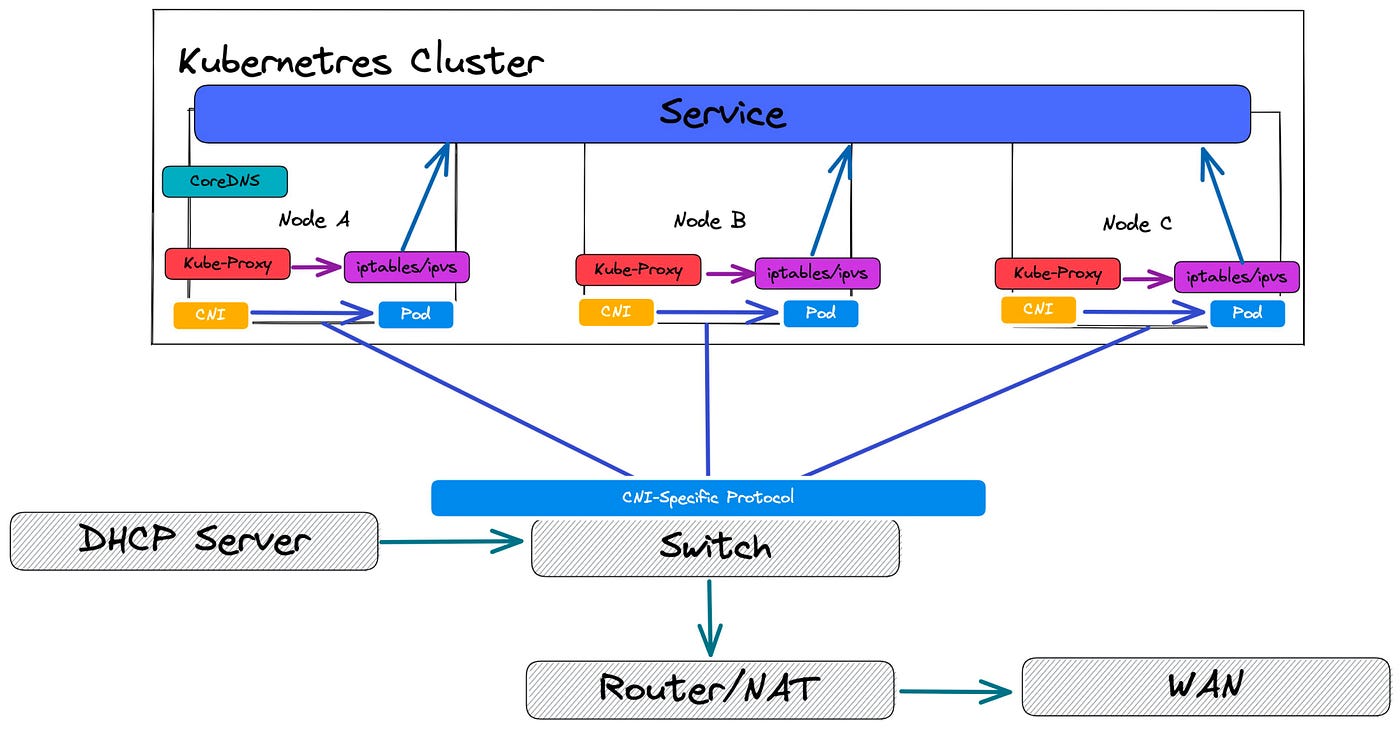
那流量是如何跨机完成转发呢,kube-proxy 只是转发规则的写入,用来选Pod,如何到达Pod不是kube-proxy的工作,这里其实就是CNI插件做的事情了,类似之前我在Docker容器网络浅析介绍Docker采用的VXLAN进行跨机的容器网络转发。
常见的CNI插件:Flannel / Calico(VXLAN 模式),Calico(BGP / 纯三层),Cilium(eBPF)。下面是CNI插件在Pod创建时的工作:
1 | kubelet |
下面是CNI和kube-proxy在整个网络模型的位置:
1 | Client |
kube-proxy 和 CNI 的分工再次总结如下:
| 层级 | 负责组件 | 做什么 |
|---|---|---|
| Service → Pod | kube-proxy | 选 Pod、做 DNAT |
| Pod ↔ Pod | CNI | 让 Pod IP 可达 |
| Node ↔ Node | 底层网络 | 承载流量 |
Connection Tracking
我们知道一个外部针对Service的请求,可能会到任何一台Node上,每个 Node 都是完整 Service 入口,所以每个 Node 上的 kube-proxy 都会 watch 所有 Service 和 EndpointSlice,然后为该 Service 创建完整的 转发规则。
这么做的设计目标是:客户端 Pod 在任何 Node 上,都能访问 Service IP,并被转发到任意一个后端 Pod。
那我们想一个问题:一个外部的请求是怎么和Pod建立固定的链接的呢?
从网络基础知识我们可以知道,一个连接请求一旦在某个 Node 上建立,就会被“粘”在这个 Node 上,后续的流程如下:
- 第一个 SYN 到达 Node A;
- 查找kube-proxy 在 Node A 上写入的转发规则,触发负载均衡决策,选中某一个 Endpoint(PodIP:Port),找到后做 DNAT;
- Linux conntrack(Windows HNS)在 Node A 记录该 TCP 连接,并进行转发;
- 后续所有的包都会走 conntrack 表转发的流程;
我们先看一下什么是conntrack,conntrack(Connection Tracking)是 Linux 内核 netfilter 子系统中的“连接状态机”,用于跟踪网络连接的状态,并记录 NAT 映射关系。 它跟踪的不是“Socket”,而是“连接五元组”:
1 | 源 IP |
👉 这就是 TCP 长连接“粘住 Pod”的原因。
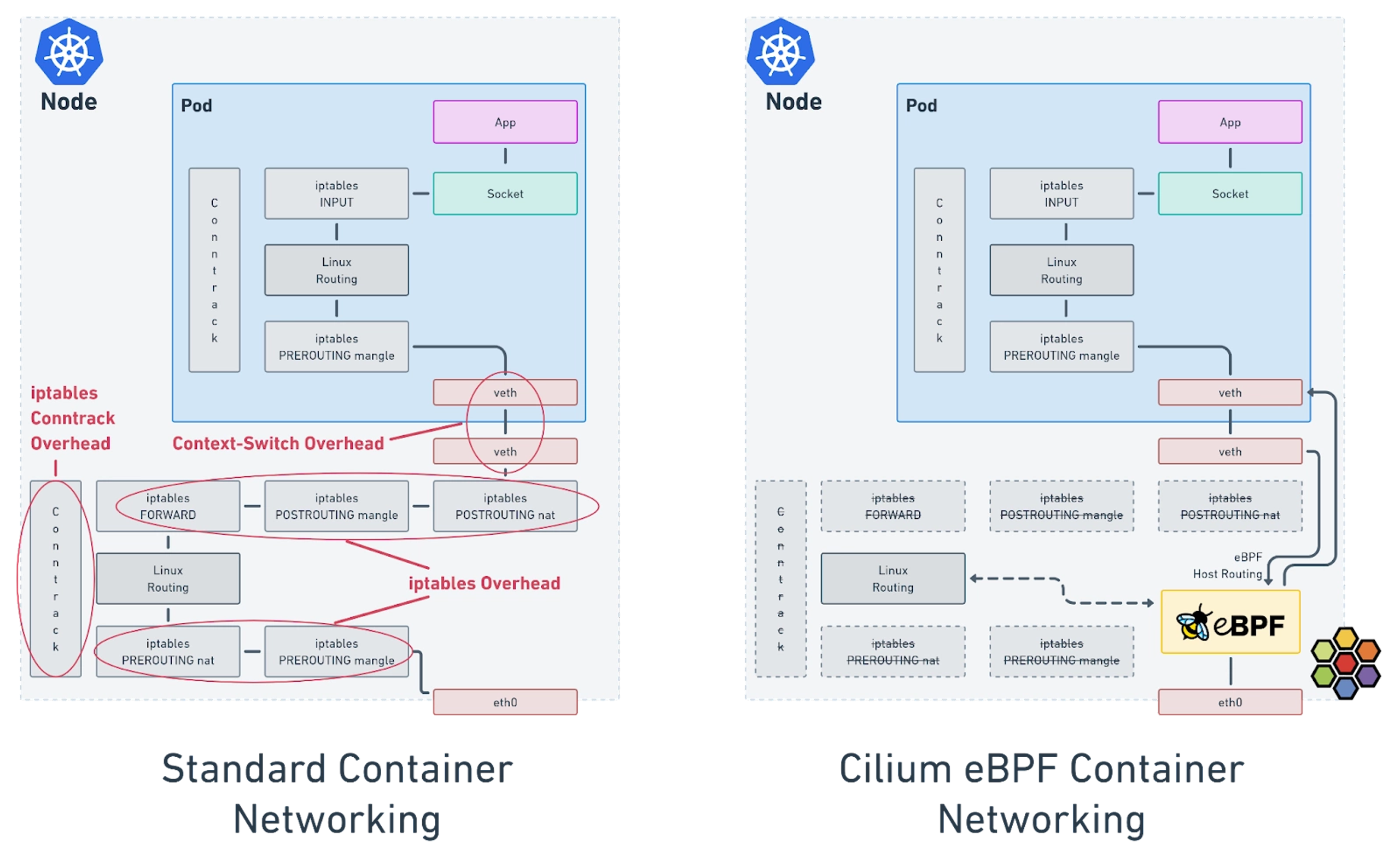
参考What is Kube-Proxy and why move from iptables to eBPF? 一文,后面我们有时间可以了解eBPF:
Ingress
Ingress 使用一种具备协议感知能力的配置机制来对外暴露你的 HTTP(或 HTTPS)网络服务,该机制能够理解 Web 概念,例如 URI、主机名(hostname)、路径(path)等。Ingress 这一概念允许你通过 Kubernetes API 中定义的规则,将流量映射到不同的后端服务。
FEATURE STATE: Kubernetes v1.19 [stable]
Ingress公开了从集群外部到集群内Service的 HTTP 和 HTTPS 路由。 Ingress 可以提供负载均衡、SSL 终止以及基于名称的虚拟主机(name-based virtual hosting)。
注意:
Kubernetes 项目建议使用 Gateway 来替代 Ingress。Ingress API 已被冻结(frozen)。
这意味着:
- Ingress API 仍然是正式可用(GA)的,并且受到 GA API 的稳定性保障。Kubernetes 项目**没有计划 **将 Ingress 从 Kubernetes 中移除。
- Ingress API 不再继续开发,未来不会再有任何功能变更或更新。
下面是一个简单示例,其中一个 Ingress 将所有流量都转发到同一个 Service:

Ingress 不能暴露任意端口或协议。如果需要将 HTTP/HTTPS 之外的服务暴露到互联网,通常应使用 Service.Type=NodePort 或 Service.Type=LoadBalancer 类型的 Service。
要使 Ingress 生效,必须部署一个 Ingress Controller。仅仅创建一个 Ingress 资源本身是不会产生任何效果的。Ingress Controller负责真正实现Ingress,通常会借助负载均衡器来完成;它也可能配置你的边缘路由器或额外的前端组件来协助处理流量。
理想情况下,所有 Ingress Controller 都应符合参考规范(reference specification),但在实际中,不同的 Ingress Controller 在行为上会存在一些细微差异。
下面是一个最小化的 Ingress 资源示例如下:
1 | apiVersion: networking.k8s.io/v1 |
基本的 apiVersion、kind、metadata 数据这里就不啰嗦了,我们下面结合IngressSpec的定义来看一下Ingress的功能,
IngressSpec结构详解
如下是IngressSpec的结构定义:
1 | // https://github.com/kubernetes/kubernetes/blob/release-1.34/staging/src/k8s.io/api/networking/v1/types.go |
IngressSpec包含了配置负载均衡器或代理服务器所需的全部信息。最重要的是,其中包含了一组规则(rules),用于匹配所有传入的请求。Ingress 资源只支持用于转发 HTTP(S) 流量的规则。
IngressClassName
ingressClassNamewere added in Kubernetes 1.18
ingressClassName 指定该 Ingress 应由哪个 Ingress Controller 负责处理。
在早期 Kubernetes 里:没有 ingressClassName 字段,Ingress Controller 靠 annotation 来“抢” Ingress,多个 Controller 可能同时处理同一个 Ingress,默认行为混乱、不确定。为了解决这个问题,Kubernetes 引入了 IngressClass 资源 + ingressClassName 字段。
如果没有设置ingressClassName 字段,可能的行为有:
- 有default IngressClass,IngressClass 可以被标记为 默认,可以接管没有
ingressClassName字段的Ingress;
1 | metadata: |
- 没有 default IngressClass,这样取决于集群中 Ingress Controller 的实现,有的可能会直接忽略,有的可能会全部接管。
DefaultBackend
如果一个 Ingress 没有定义任何规则,那么所有流量都会被发送到一个单一的默认后端(一个Service对象或一个Resource对象),该后端由 .spec.defaultBackend 指定。
默认后端在传统上是 Ingress Controller 的一个配置选项,而不是在 Ingress 资源中显式指定的。
- 如果没有定义
.spec.rules,则 必须指定.spec.defaultBackend; - 如果未设置
defaultBackend,那么不匹配任何规则的请求如何处理将取决于具体的 Ingress Controller; - 如果多个Ingress都没有定义
.spec.rules,且都指定.spec.defaultBackend,那么具体行为取决于具体的 Ingress Controller;通常只会有“一个”真正生效的 default backend,其余的会被忽略或覆盖;
如果 HTTP 请求在任何 Ingress 对象中都没有匹配到 host 或 path,则流量会被路由到默认后端。
.spec.defaultBackend的结构IngressBackend的定义如下:
1 | // https://github.com/kubernetes/kubernetes/blob/release-1.34/staging/src/k8s.io/api/networking/v1/types.go |
Ingress的后端对象可以是一个Service对象或一个Resource对象,Service对象我们可以理解,Resource对象是什么呢?资源后端(Resource backend) 是一个指向与 Ingress 对象位于同一命名空间内的其他 Kubernetes 资源的 ObjectRef。
Resource与Service是互斥的配置- 如果同时指定两者,将导致校验失败
资源后端的一个常见用途是:将 Ingress 流量导入一个对象存储后端,用于提供静态资源。
IngressRule
每个Ingress对象都包含一组规则Rules,每一条 HTTP 规则的定义如下:
1 | // https://github.com/kubernetes/kubernetes/blob/release-1.34/staging/src/k8s.io/api/networking/v1/types.go |
包含以下信息:
- 可选的 host:匹配指定的host,在上面的示例中未指定 host,因此该规则适用于通过指定 IP 地址进入的所有 HTTP 流量。如果指定了 host(例如
foo.bar.com),则规则只会应用于该主机名。 - 一组 path 列表(例如
/testpath):每个 path 都关联一个 backend,该 backend 通过service.name和service.port.name或service.port.number定义。只有当 host 和 path 都与传入请求匹配时,负载均衡器才会将流量转发到对应的 Service。 - Backend(后端):Backend 是 Service 与端口名的组合,或者通过 CRD 定义的自定义资源后端。 与规则中 host 和 path 匹配的 HTTP(或 HTTPS)请求会被发送到对应的 backend。
Ingress 中的每一个 path 都必须指定一个 pathType。未显式指定 pathType 的 path 会导致校验失败。
支持的三种 pathType 如下:
- ImplementationSpecific:路径匹配方式由 IngressClass 自行决定。实现可以将其作为一种独立的类型,或者与
Prefix/Exact等价处理。 - Exact:与 URL 路径进行完全匹配,并且区分大小写。
- Prefix:基于 URL 路径前缀进行匹配,并以
/作为分隔符逐段匹配。匹配是区分大小写的,并且是按路径段(path element)进行的。如果请求路径中每一段都以前缀路径的对应段开头,则认为匹配成功。
注意:
如果 path 的最后一个元素只是请求路径最后一个元素的子串,则不算匹配。例如:/foo/bar可以匹配/foo/bar/baz,但不能匹配/foo/barbaz。
IngressRule的Host可以是精确匹配(例如 foo.bar.com),也可以是通配符匹配(例如 *.foo.com)。
- 精确匹配:要求 HTTP 请求头中的
Host与host字段完全一致。 - 通配符匹配:要求 HTTP 请求头中的
Host与通配符规则的后缀部分相同。
| Host | Host header | Match? |
|---|---|---|
*.foo.com |
bar.foo.com |
Matches based on shared suffix |
*.foo.com |
baz.bar.foo.com |
No match, wildcard only covers a single DNS label |
*.foo.com |
foo.com |
No match, wildcard only covers a single DNS label |
IngressClass
前面介绍IngressSpec结构定义的时候介绍过.spec.ingressClassName ,这里再展开介绍一下IngressClass的API对象。
Ingress 可以由不同的 Controller 来实现,而这些 Controller 往往具有不同的配置方式。每一个 Ingress 都应该指定一个 class,也就是对某个 IngressClass 资源的引用。IngressClass 中包含了额外的配置,其中包括应该由哪个 Ingress Controller 来实现该 class。
如下是一个IngressClass资源对象的示例:
1 | apiVersion: networking.k8s.io/v1 |
IngressClass 的 .spec.parameters 字段允许你引用另一个资源,该资源为该 IngressClass 提供相关的配置。具体使用哪种类型的 parameters,取决于你在 IngressClass 的 .spec.controller 字段中指定的 Ingress Controller。
IngressClass 的作用域
根据你使用的 Ingress Controller,你可能可以使用:
- 集群级(Cluster) 参数
- 命名空间级(Namespaced) 参数
IngressClass parameters 的默认作用域是 集群级(cluster-wide)。
如果你设置了 .spec.parameters 字段,但没有设置 .spec.parameters.scope,或者你将 .spec.parameters.scope 显式设置为 Cluster,那么该 IngressClass 引用的是一个 集群级资源。此时:
kind(结合apiGroup)必须指向一个 集群级 API(可能是一个自定义资源)name标识该 API 下的某一个具体的集群级资源
例如:
1 | apiVersion: networking.k8s.io/v1 |
Deprecated annotation
在 Kubernetes 1.18 引入 IngressClass 资源和 ingressClassName 字段之前,Ingress class 是通过在 Ingress 上设置 kubernetes.io/ingress.class annotation 来指定的。该 annotation 从未被正式写入 API 规范,但被大量 Ingress Controller 所支持。
新的 ingressClassName 字段是对该 annotation 的替代方案,但并不是完全等价的:
- 旧 annotation 通常直接引用要实现该 Ingress 的 Controller 名称
- 新字段引用的是一个 IngressClass 资源,IngressClass 中不仅包含 Controller 名称,还可以包含额外的 Ingress 配置
Default IngressClass
你可以将某一个 IngressClass 标记为集群的默认 IngressClass。
在 IngressClass 资源上设置如下 annotation:
1 | ingressclass.kubernetes.io/is-default-class: "true" |
这样可以确保:新创建且未指定 ingressClassName 的 Ingress 会自动使用该默认 IngressClass。
Ingress的使用
Simple fanout
扇出(fanout)配置可以根据所请求的 HTTP URI,将来自同一个 IP 地址的流量路由到多个 Service。 Ingress 允许你将所需的负载均衡器数量控制在最低。
例如,下图所示简单的fanout架构:

对应的Ingress的配置如下:
1 | apiVersion: networking.k8s.io/v1 |
Name based virtual hosting
基于名称的虚拟主机支持在同一个 IP 地址上,将 HTTP 流量路由到多个主机名。如下:

如下是对应的配置:
1 | apiVersion: networking.k8s.io/v1 |
Load balancing
Ingress Controller 在启动时会配置一组负载均衡策略设置,并将这些策略应用到所有 Ingress 上,例如:
- 负载均衡算法
- 后端权重方案
- 以及其他相关设置
一些更高级的负载均衡概念(例如:会话保持、动态权重)目前尚未通过 Ingress 暴露。如果你需要这些功能,可以通过 Service 所使用的负载均衡器 来获得。
另外需要注意的是,虽然 Ingress 本身并未直接暴露健康检查(health checks),但 Kubernetes 中存在一些并行的概念(例如 readiness probe),可以让你达到相同的效果。
总结
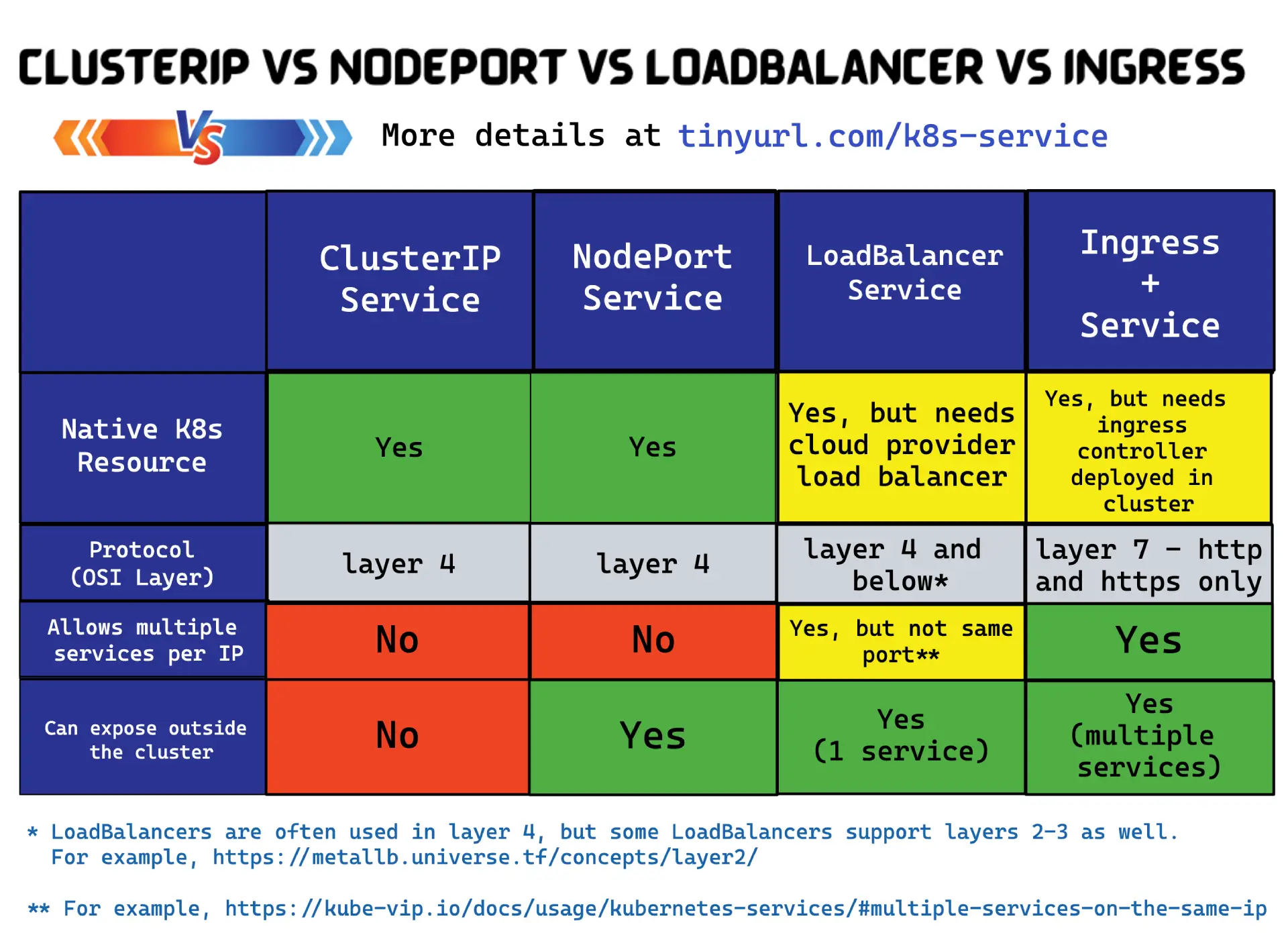
如下两个图很好的说明了Serivce和Ingress的概念和网络模型结构:
https://medium.com/avmconsulting-blog/service-types-in-kubernetes-24a1587677d6
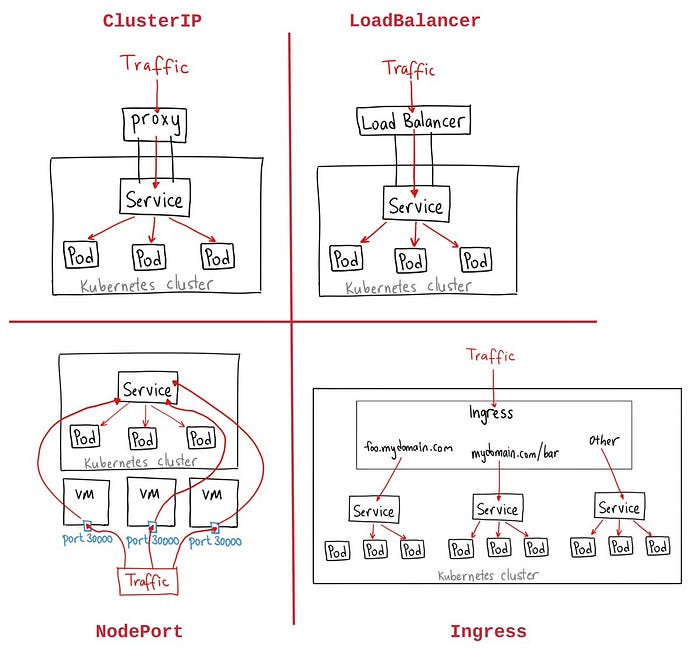
https://home.robusta.dev/blog/kubernetes-service-vs-loadbalancer-vs-ingress