Kubernetes之Volumes存储基础介绍

  1. Volumes(卷)
    1. emptyDir - 临时数据存储
    2. hostPath - 宿主机路径挂载
    3. configMap - 配置数据注入
    4. secret - 敏感数据管理
    5. downwardAPI - Pod 元数据注入
  2. Projected Volumes(投射卷)
  3. Ephemeral Volume(临时卷)
  4. Persistent Volumes(持久卷)
    1. PV & PVC
    2. Static & Dynamic
    3. Binding
    4. Access Mode
    5. Reclaiming
    6. PersistentVolume Source
  5. Storage Classes(存储类)
  6. Volume Attributes Classes(卷属性类)
  7. Dynamic Volume Provisioning(动态卷供应)
  8. Volume Snapshots(卷快照)
  9. CSI Volume Cloning(CSI 卷克隆)

在云原生时代,Kubernetes 已经成为容器编排的事实标准。然而,容器的短暂特性带来了一个根本性的挑战:如何持久化和管理数据?

想象这样一个场景:你的应用容器因为某种原因崩溃了,Kubernetes 会立即重启一个新的容器实例。但问题来了——之前容器中的所有数据都消失了!数据库的记录、用户上传的文件、应用的日志,全部丢失。这显然是不可接受的。

这就是 Kubernetes Storage 系统要解决的核心问题。本文在AI的帮助下,快速学习一下 Kubernetes 存储的方方面面,从最基础的 Volume 概念到高级的 CSI 驱动实现。


Volumes(卷)

在深入技术细节之前,让我们先理解容器存储面临的两个根本性问题:

  1. 容器文件系统的短暂性

容器中的磁盘文件是临时的,这给在容器中运行的非简单应用程序带来了一些问题。一个问题是当容器崩溃或停止时,容器状态不会被保存,因此在容器生命周期内创建或修改的所有文件都会丢失。

这一点,我在浅析Docker基于overlay的存储结构中有详细介绍,Container的读写层是基于Image roLayer + Container init-Layer堆叠而成;Container在运行的时候创建了init-Layer,停止后该Layer就会自动销毁。

  1. 容器间数据共享

当多个容器需要访问相同的数据时,例如:

  • Web 服务器容器和日志收集器容器共享日志目录
  • 应用容器和 Sidecar 容器共享配置文件
  • 多个处理容器共享工作队列

没有 Volume,这些场景将无法实现。Kubernetes volumes 为 Pod 中的容器提供了一种通过文件系统访问和共享数据的方式。与 Docker 卷不同,Kubernetes Volume 有明确的生命周期,可以比容器更持久。

Kubernetes volumes 可用于不同的目的,包括:基于 ConfigMap 或 Secret 填充配置文件、为 Pod 提供临时暂存空间、在同一 Pod 中的两个不同容器之间共享文件系统、在两个不同 Pod 之间共享文件系统(即使这些 Pod 运行在不同节点上)、持久化存储数据以便在 Pod 重启或替换后数据仍然可用、基于 Pod 容器的详细信息向容器中运行的应用传递配置信息(例如:告诉 sidecar 容器 Pod 正在哪个命名空间中运行)、提供对不同容器镜像中数据的只读访问。

让我们通过具体场景来理解:

  • 场景 1:容器内进程间数据共享
1
2
3
同一容器内
├── 主进程 (写入日志)
└── 日志轮转进程 (读取日志) ──> 共享 /var/log
  • 场景 2:同一 Pod 内容器间共享
1
2
3
4
5
Pod: nginx-with-logger
├── nginx 容器
│ └── 写入访问日志 -> /var/log/nginx
└── fluentd 容器
└── 读取日志 -> /var/log/nginx (同一个 Volume)
  • 场景 3:跨 Pod 数据共享
1
2
3
4
5
Node A                    Node B
├── Pod 1 (写入者) ├── Pod 2 (读取者)
└── 写入 NFS └── 读取 NFS
│ │
└────── 共享 NFS ────────┘
  • 场景 4:持久化数据
1
2
3
4
5
6
7
数据库 Pod (版本 1)
└── 写入数据到 PV

Pod 重启/升级

数据库 Pod (版本 2)
└── 从同一个 PV 读取数据 (数据保留)

关于Volume结构的定义如下:

1
2
3
4
5
6
7
8
9
10
11
12
13
14
15
16
17
18
19
20
21
22
23
24
25
26
27
28
29
30
31
32
33
34
35
36
37
38
39
40
41
42
43
44
45
46
47
48
49
50
51
52
53
54
55
56
57
58
// https://github.com/kubernetes/kubernetes/blob/release-1.34/staging/src/k8s.io/api/core/v1/types.go

type Volume struct {
// name of the volume.
// Must be a DNS_LABEL and unique within the pod.
// More info: https://kubernetes.io/docs/concepts/overview/working-with-objects/names/#names
Name string `json:"name" protobuf:"bytes,1,opt,name=name"`
// volumeSource represents the location and type of the mounted volume.
// If not specified, the Volume is implied to be an EmptyDir.
// This implied behavior is deprecated and will be removed in a future version.
VolumeSource `json:",inline" protobuf:"bytes,2,opt,name=volumeSource"`
}

// Represents the source of a volume to mount.
// Only one of its members may be specified.
type VolumeSource struct {

HostPath *HostPathVolumeSource `json:"hostPath,omitempty" protobuf:"bytes,1,opt,name=hostPath"`

EmptyDir *EmptyDirVolumeSource `json:"emptyDir,omitempty" protobuf:"bytes,2,opt,name=emptyDir"`

Secret *SecretVolumeSource `json:"secret,omitempty" protobuf:"bytes,6,opt,name=secret"`

NFS *NFSVolumeSource `json:"nfs,omitempty" protobuf:"bytes,7,opt,name=nfs"`

ISCSI *ISCSIVolumeSource `json:"iscsi,omitempty" protobuf:"bytes,8,opt,name=iscsi"`

PersistentVolumeClaim *PersistentVolumeClaimVolumeSource `json:"persistentVolumeClaim,omitempty" protobuf:"bytes,10,opt,name=persistentVolumeClaim"`

DownwardAPI *DownwardAPIVolumeSource `json:"downwardAPI,omitempty" protobuf:"bytes,16,opt,name=downwardAPI"`

FC *FCVolumeSource `json:"fc,omitempty" protobuf:"bytes,17,opt,name=fc"`

ConfigMap *ConfigMapVolumeSource `json:"configMap,omitempty" protobuf:"bytes,19,opt,name=configMap"`

Projected *ProjectedVolumeSource `json:"projected,omitempty" protobuf:"bytes,26,opt,name=projected"`

CSI *CSIVolumeSource `json:"csi,omitempty" protobuf:"bytes,28,opt,name=csi"`

Ephemeral *EphemeralVolumeSource `json:"ephemeral,omitempty" protobuf:"bytes,29,opt,name=ephemeral"`
// image represents an OCI object (a container image or artifact) pulled and mounted on the kubelet's host machine.
// The volume is resolved at pod startup depending on which PullPolicy value is provided:
//
// - Always: the kubelet always attempts to pull the reference. Container creation will fail If the pull fails.
// - Never: the kubelet never pulls the reference and only uses a local image or artifact. Container creation will fail if the reference isn't present.
// - IfNotPresent: the kubelet pulls if the reference isn't already present on disk. Container creation will fail if the reference isn't present and the pull fails.
//
// The volume gets re-resolved if the pod gets deleted and recreated, which means that new remote content will become available on pod recreation.
// A failure to resolve or pull the image during pod startup will block containers from starting and may add significant latency. Failures will be retried using normal volume backoff and will be reported on the pod reason and message.
// The types of objects that may be mounted by this volume are defined by the container runtime implementation on a host machine and at minimum must include all valid types supported by the container image field.
// The OCI object gets mounted in a single directory (spec.containers[*].volumeMounts.mountPath) by merging the manifest layers in the same way as for container images.
// The volume will be mounted read-only (ro) and non-executable files (noexec).
// Sub path mounts for containers are not supported (spec.containers[*].volumeMounts.subpath) before 1.33.
// The field spec.securityContext.fsGroupChangePolicy has no effect on this volume type.
// +featureGate=ImageVolume
// +optional
Image *ImageVolumeSource `json:"image,omitempty" protobuf:"bytes,30,opt,name=image"`
}

Kubernetes 支持多种 Volume 类型,每种类型适用于不同的场景。让我们详细探讨最常用的类型:

emptyDir - 临时数据存储

核心特性:

  • 初始内容为空(因此得名 emptyDir)
  • emptyDir 卷在 Kubernetes 将 Pod 分配到节点时创建
  • Pod 删除时,emptyDir 中的数据会被永久删除
  • 容器崩溃不会导致数据丢失

emptyDir的结构定义如下:

1
2
3
4
5
6
7
8
9
10
11
12
13
14
15
16
17
18
19
20
21
// https://github.com/kubernetes/kubernetes/blob/release-1.34/staging/src/k8s.io/api/core/v1/types.go

// StorageMedium defines ways that storage can be allocated to a volume.
type StorageMedium string

const (
StorageMediumDefault StorageMedium = "" // use whatever the default is for the node, assume anything we don't explicitly handle is this
StorageMediumMemory StorageMedium = "Memory" // use memory (e.g. tmpfs on linux)
StorageMediumHugePages StorageMedium = "HugePages" // use hugepages
StorageMediumHugePagesPrefix StorageMedium = "HugePages-" // prefix for full medium notation HugePages-<size>
)

type EmptyDirVolumeSource struct {
// medium represents what type of storage medium should back this directory.
// The default is "" which means to use the node's default medium.
// More info: https://kubernetes.io/docs/concepts/storage/volumes#emptydir
// +optional
Medium StorageMedium `json:"medium,omitempty" protobuf:"bytes,1,opt,name=medium,casttype=StorageMedium"`
// sizeLimit is the total amount of local storage required for this EmptyDir volume.
SizeLimit *resource.Quantity `json:"sizeLimit,omitempty" protobuf:"bytes,2,opt,name=sizeLimit"`
}

如下存储介质:

1
2
3
4
5
6
7
8
9
10
11
# 默认使用节点磁盘
volumes:
- name: cache-volume
emptyDir: {}

# 使用内存(tmpfs)- 速度更快但容量有限
volumes:
- name: memory-cache
emptyDir:
medium: Memory
sizeLimit: 1Gi # 限制大小

典型用例:编译过程中的临时文件,图片处理的中间结果,下载的临时文件,容器间数据共享等,如下:

用例 1:临时缓存

1
2
3
4
5
6
7
8
9
10
11
12
13
14
15
apiVersion: v1
kind: Pod
metadata:
name: cache-pod
spec:
containers:
- name: app
image: myapp:latest
volumeMounts:
- name: cache
mountPath: /app/cache
volumes:
- name: cache
emptyDir:
sizeLimit: 5Gi

用例 2:容器间数据共享

1
2
3
4
5
6
7
8
9
10
11
12
13
14
15
16
17
18
19
20
21
22
23
24
25
26
27
28
apiVersion: v1
kind: Pod
metadata:
name: data-processor
spec:
containers:
# 生产者容器
- name: producer
image: data-producer:latest
command: ["/bin/sh"]
args: ["-c", "while true; do date >> /data/output.txt; sleep 5; done"]
volumeMounts:
- name: shared-data
mountPath: /data

# 消费者容器
- name: consumer
image: data-consumer:latest
command: ["/bin/sh"]
args: ["-c", "tail -f /data/output.txt"]
volumeMounts:
- name: shared-data
mountPath: /data
readOnly: true # 只读挂载,更安全

volumes:
- name: shared-data
emptyDir: {}

hostPath - 宿主机路径挂载

核心概念: hostPath 允许 Pod 访问位于宿主机节点文件系统上的文件或目录,通常用于单节点测试。

重要警告:

1
2
3
4
5
⚠️ 安全风险:
- Pod 可以访问宿主机的敏感文件
- 可能被用来逃逸容器
- 不同节点的 hostPath 路径内容不同
- 生产环境应谨慎使用

hostPath的Volume的结构定义如下:

1
2
3
4
5
6
7
8
9
10
11
12
13
14
15
16
17
18
19
20
21
22
23
24
25
26
27
28
29
30
31
32
33
34
35
36
37
38
// https://github.com/kubernetes/kubernetes/blob/release-1.34/staging/src/k8s.io/api/core/v1/types.go
// +enum
type HostPathType string

const (
// For backwards compatible, leave it empty if unset
HostPathUnset HostPathType = ""
// If nothing exists at the given path, an empty directory will be created there
// as needed with file mode 0755, having the same group and ownership with Kubelet.
HostPathDirectoryOrCreate HostPathType = "DirectoryOrCreate"
// A directory must exist at the given path
HostPathDirectory HostPathType = "Directory"
// If nothing exists at the given path, an empty file will be created there
// as needed with file mode 0644, having the same group and ownership with Kubelet.
HostPathFileOrCreate HostPathType = "FileOrCreate"
// A file must exist at the given path
HostPathFile HostPathType = "File"
// A UNIX socket must exist at the given path
HostPathSocket HostPathType = "Socket"
// A character device must exist at the given path
HostPathCharDev HostPathType = "CharDevice"
// A block device must exist at the given path
HostPathBlockDev HostPathType = "BlockDevice"
)

// Represents a host path mapped into a pod.
// Host path volumes do not support ownership management or SELinux relabeling.
type HostPathVolumeSource struct {
// path of the directory on the host.
// If the path is a symlink, it will follow the link to the real path.
// More info: https://kubernetes.io/docs/concepts/storage/volumes#hostpath
Path string `json:"path" protobuf:"bytes,1,opt,name=path"`
// type for HostPath Volume
// Defaults to ""
// More info: https://kubernetes.io/docs/concepts/storage/volumes#hostpath
// +optional
Type *HostPathType `json:"type,omitempty" protobuf:"bytes,2,opt,name=type"`
}

type 字段详解:

1
2
3
4
5
volumes:
- name: host-volume
hostPath:
path: /data # 宿主机路径
type: Directory # 类型

type 可选值:

Type 说明 使用场景
"" 不做任何检查(默认) 快速测试
DirectoryOrCreate 目录不存在则创建 需要确保目录存在
Directory 必须存在且是目录 挂载已有目录
FileOrCreate 文件不存在则创建 日志文件等
File 必须存在且是文件 挂载配置文件
Socket 必须是 UNIX socket Docker socket 等
CharDevice 必须是字符设备 GPU 设备等
BlockDevice 必须是块设备 裸块存储

实际用例:日志收集

1
2
3
4
5
6
7
8
9
10
11
12
13
14
15
16
17
18
19
20
21
22
23
24
apiVersion: v1
kind: Pod
metadata:
name: log-collector
spec:
containers:
- name: fluentd
image: fluentd:latest
volumeMounts:
- name: varlog
mountPath: /var/log
readOnly: true
- name: varlibdockercontainers
mountPath: /var/lib/docker/containers
readOnly: true
volumes:
- name: varlog
hostPath:
path: /var/log
type: Directory
- name: varlibdockercontainers
hostPath:
path: /var/lib/docker/containers
type: Directory

configMap - 配置数据注入

核心概念: ConfigMap 允许你将配置数据与容器镜像解耦,实现配置的外部化管理。configMap 卷提供了向 Pod 注入配置数据的方法。 ConfigMap 对象中存储的数据可以被 configMap 类型的卷引用,然后被 Pod 中运行的容器化应用使用。

创建 ConfigMap 的多种方式,例如:从字面值创建从文件创建YAML 定义

ConfigMap Volume结构的定义如下:

1
2
3
4
5
6
7
8
9
10
11
12
13
14
15
16
17
18
19
20
21
22
23
24
25
26
// https://github.com/kubernetes/kubernetes/blob/release-1.34/staging/src/k8s.io/api/core/v1/types.go

type LocalObjectReference struct {
// Name of the referent.
Name string `json:"name,omitempty" protobuf:"bytes,1,opt,name=name"`
}

type ConfigMapVolumeSource struct {
LocalObjectReference `json:",inline" protobuf:"bytes,1,opt,name=localObjectReference"`
// items if unspecified, each key-value pair in the Data field of the referenced
// ConfigMap will be projected into the volume as a file whose name is the
// key and content is the value. If specified, the listed keys will be
// projected into the specified paths, and unlisted keys will not be
// present. If a key is specified which is not present in the ConfigMap,
// the volume setup will error unless it is marked optional. Paths must be
// relative and may not contain the '..' path or start with '..'.
// +optional
// +listType=atomic
Items []KeyToPath `json:"items,omitempty" protobuf:"bytes,2,rep,name=items"`

// Defaults to 0644.
DefaultMode *int32 `json:"defaultMode,omitempty" protobuf:"varint,3,opt,name=defaultMode"`
// optional specify whether the ConfigMap or its keys must be defined
// +optional
Optional *bool `json:"optional,omitempty" protobuf:"varint,4,opt,name=optional"`
}

使用 ConfigMap 的多种方式:如下是作为 Volume 挂载的示例:

1
2
3
4
5
6
7
8
9
10
11
12
13
14
15
apiVersion: v1
kind: Pod
metadata:
name: config-volume-pod
spec:
containers:
- name: app
image: myapp:latest
volumeMounts:
- name: config
mountPath: /etc/config
volumes:
- name: config
configMap:
name: app-config

如下是挂载特定键

1
2
3
4
5
6
7
8
9
10
11
12
13
14
15
16
17
18
19
20
apiVersion: v1
kind: Pod
metadata:
name: selective-config-pod
spec:
containers:
- name: app
image: nginx:latest
volumeMounts:
- name: nginx-config
mountPath: /etc/nginx/nginx.conf
subPath: nginx.conf # 只挂载文件,不影响目录其他内容
volumes:
- name: nginx-config
configMap:
name: nginx-config
items:
- key: nginx.conf
path: nginx.conf
mode: 0644 # 文件权限

secret - 敏感数据管理

核心概念: Secret 用于存储和管理敏感信息,如密码、OAuth 令牌、SSH 密钥等。secret 卷用来给 Pod 传递敏感信息,例如密码。你可以将 Secret 存储在 Kubernetes API 服务器上,然后以文件的形式挂载到 Pod 中,无需直接与 Kubernetes 耦合。 secret 卷由 tmpfs(基于 RAM 的文件系统)提供存储,因此它们永远不会被写入非易失性(持久化的)存储器。

Secret Volume的结构定义如下:

1
2
3
4
5
6
7
8
9
10
11
12
13
14
15
16
17
18
19
20
21
22
23
// https://github.com/kubernetes/kubernetes/blob/release-1.34/staging/src/k8s.io/api/core/v1/types.go

type SecretVolumeSource struct {
// secretName is the name of the secret in the pod's namespace to use.
// More info: https://kubernetes.io/docs/concepts/storage/volumes#secret
// +optional
SecretName string `json:"secretName,omitempty" protobuf:"bytes,1,opt,name=secretName"`
// items If unspecified, each key-value pair in the Data field of the referenced
// Secret will be projected into the volume as a file whose name is the
// key and content is the value. If specified, the listed keys will be
// projected into the specified paths, and unlisted keys will not be
// present. If a key is specified which is not present in the Secret,
// the volume setup will error unless it is marked optional. Paths must be
// relative and may not contain the '..' path or start with '..'.
// +optional
// +listType=atomic
Items []KeyToPath `json:"items,omitempty" protobuf:"bytes,2,rep,name=items"`
// for mode bits. Defaults to 0644.
DefaultMode *int32 `json:"defaultMode,omitempty" protobuf:"bytes,3,opt,name=defaultMode"`
// optional field specify whether the Secret or its keys must be defined
// +optional
Optional *bool `json:"optional,omitempty" protobuf:"varint,4,opt,name=optional"`
}

Secret 类型:

类型 说明 用途
Opaque 任意用户定义数据(默认) 密码、API 密钥
kubernetes.io/service-account-token ServiceAccount 令牌 Kubernetes API 访问
kubernetes.io/dockercfg Docker 配置文件 私有镜像仓库认证
kubernetes.io/dockerconfigjson Docker config.json 私有镜像仓库认证(新格式)
kubernetes.io/basic-auth 基本认证 用户名和密码
kubernetes.io/ssh-auth SSH 认证 SSH 私钥
kubernetes.io/tls TLS 证书和密钥 HTTPS/TLS
bootstrap.kubernetes.io/token Bootstrap token 节点引导

创建 Secret的方式有多种,例如:从字面值从文件从Docker 镜像仓库从YAML(需要 base64 编码)

1
2
3
4
5
6
7
8
9
10
11
12
13
14
15
apiVersion: v1
kind: Secret
metadata:
name: db-secret
type: Opaque
data:
# echo -n 'admin' | base64
username: YWRtaW4=
# echo -n 'P@ssw0rd' | base64
password: UEBzc3cwcmQ=

# 或使用 stringData(自动编码)
stringData:
username: admin
password: P@ssw0rd

如下通过Volume 挂载

1
2
3
4
5
6
7
8
9
10
11
12
13
14
15
16
17
apiVersion: v1
kind: Pod
metadata:
name: secret-volume-pod
spec:
containers:
- name: app
image: myapp:latest
volumeMounts:
- name: secret-volume
mountPath: /etc/secrets
readOnly: true # 强烈建议只读
volumes:
- name: secret-volume
secret:
secretName: db-secret
defaultMode: 0400 # 只读权限

结果:

1
2
3
/etc/secrets/
├── username (内容: admin)
└── password (内容: P@ssw0rd)

这里也简单介绍一下ConfigMap和Secret两种Kubernetes资源对象的差异:

特性 ConfigMap Secret
用途 存储非敏感配置数据(如 app.conf、feature flags、环境变量) 存储敏感数据(如数据库密码、API 密钥、TLS 证书、OAuth Token)
数据格式 普通字符串或文件 数据以 Base64 编码 存储(⚠️ 不是加密!)
安全性 无特殊安全保护,明文存储 默认仅 Base64 编码(可被解码),但支持:
• 启用 Encryption at Rest(需手动配置)
• RBAC 控制访问权限
大小限制 建议 ≤ 1 MB(受 etcd 限制) 同样建议 ≤ 1 MB(etcd 限制)
挂载方式 可作为环境变量或 Volume 挂载到 Pod 同样可作为环境变量或 Volume 挂载到 Pod
更新行为 Volume 挂载的 ConfigMap 支持自动更新(约 1 分钟延迟,需容器内应用重新读取) Volume 挂载的 Secret 也支持自动更新(同上)
默认权限(Volume 挂载) 文件权限为 644(可读) 文件权限为 644,但可通过 defaultMode 设置(如 400 更安全)
是否加密传输 否(通过 API Server 明文传输) 否(Base64 不是加密),但可通过 TLS 加密 API 通信(Kubernetes 默认启用)
最佳实践 用于解耦配置与镜像,实现环境差异化 绝不将敏感信息硬编码在镜像或 ConfigMap 中;优先使用 Secret,并结合外部密钥管理(如 Vault、AWS Secrets Manager)

downwardAPI - Pod 元数据注入

核心概念: Downward API 允许容器访问关于自身或集群的信息,而无需直接调用 Kubernetes API。downwardAPI 卷用于为应用提供 downward API 数据。 在这类卷中,所公开的数据以纯文本格式的只读文件形式存在。

DownwardAPI的Volume结构定义如下:

1
2
3
4
5
6
7
8
9
10
11
12
13
14
15
16
17
18
19
20
21
22
23
24
// https://github.com/kubernetes/kubernetes/blob/release-1.34/staging/src/k8s.io/api/core/v1/types.go

type DownwardAPIVolumeSource struct {
// Items is a list of downward API volume file
// +optional
// +listType=atomic
Items []DownwardAPIVolumeFile `json:"items,omitempty" protobuf:"bytes,1,rep,name=items"`
// Defaults to 0644.
DefaultMode *int32 `json:"defaultMode,omitempty" protobuf:"varint,2,opt,name=defaultMode"`
}

// DownwardAPIVolumeFile represents information to create the file containing the pod field
type DownwardAPIVolumeFile struct {
// Required: Path is the relative path name of the file to be created. Must not be absolute or contain the '..' path. Must be utf-8 encoded. The first item of the relative path must not start with '..'
Path string `json:"path" protobuf:"bytes,1,opt,name=path"`
// Required: Selects a field of the pod: only annotations, labels, name, namespace and uid are supported.
// +optional
FieldRef *ObjectFieldSelector `json:"fieldRef,omitempty" protobuf:"bytes,2,opt,name=fieldRef"`
// Selects a resource of the container: only resources limits and requests
// (limits.cpu, limits.memory, requests.cpu and requests.memory) are currently supported.
// +optional
ResourceFieldRef *ResourceFieldSelector `json:"resourceFieldRef,omitempty" protobuf:"bytes,3,opt,name=resourceFieldRef"`
Mode *int32 `json:"mode,omitempty" protobuf:"varint,4,opt,name=mode"`
}

从上面的定义可知,目前Downward API的Volume只支持访问Pod的: Selects a field of the pod: only annotations, labels, name, namespace and uid are supported.

如下是通过DownwardAPI Volume 来访问Pod的相关Metadata数据:

1
2
3
4
5
6
7
8
9
10
11
12
13
14
15
16
17
18
19
20
21
22
23
24
25
26
27
28
29
30
31
32
33
34
35
36
37
38
39
40
41
42
43
44
apiVersion: v1
kind: Pod
metadata:
name: downward-api-volume
labels:
environment: production
tier: backend
annotations:
build: "12345"
commit: "abc123"
spec:
containers:
- name: app
image: busybox
command: ["sh", "-c", "ls -laR /etc/podinfo && sleep 3600"]
volumeMounts:
- name: podinfo
mountPath: /etc/podinfo
volumes:
- name: podinfo
downwardAPI:
items:
# Pod 标签
- path: "labels"
fieldRef:
fieldPath: metadata.labels
# Pod 注解
- path: "annotations"
fieldRef:
fieldPath: metadata.annotations
# Pod 名称
- path: "pod_name"
fieldRef:
fieldPath: metadata.name
# 命名空间
- path: "namespace"
fieldRef:
fieldPath: metadata.namespace
# 资源信息
- path: "cpu_request"
resourceFieldRef:
containerName: app
resource: requests.cpu
divisor: 1m

Projected Volumes(投射卷)

Projected Volume(投射卷) 是 Kubernetes 中一种特殊的卷类型,它允许你将多个不同来源的数据(如密钥、配置、令牌等)合并挂载到 Pod 中的同一个目录下,而无需为每个数据源分别挂载不同的目录。目前,以下类型的卷源可以被投射:

假设你的应用需要:

  • 一个数据库密码(存放在 Secret 中),
  • 一些配置参数(存放在 ConfigMap 中),
  • 以及当前 Pod 的元信息(如 Pod 名称、命名空间,可通过 Downward API 获取)。

你可以使用一个 projected 卷,将这三者全部挂载到容器内的 /etc/config 目录下,每个数据源以独立的文件形式出现,这样既整洁又方便管理。如下:

1
2
3
4
5
6
7
8
9
10
11
12
13
14
15
16
17
18
19
20
21
22
23
24
25
26
27
28
29
30
31
32
33
34
35
36
apiVersion: v1
kind: Pod
metadata:
name: volume-test
spec:
containers:
- name: container-test
image: busybox:1.28
command: ["sleep", "3600"]
volumeMounts:
- name: all-in-one
mountPath: "/projected-volume"
readOnly: true
volumes:
- name: all-in-one
projected:
sources:
- secret:
name: mysecret
items:
- key: username
path: my-group/my-username
- downwardAPI:
items:
- path: "labels"
fieldRef:
fieldPath: metadata.labels
- path: "cpu_limit"
resourceFieldRef:
containerName: container-test
resource: limits.cpu
- configMap:
name: myconfigmap
items:
- key: config
path: my-group/my-config

这种机制体现了 Kubernetes “声明式配置”和“关注点分离”的设计哲学:数据来源各自管理,但可在运行时灵活组合。

Ephemeral Volume(临时卷)

在 Kubernetes 中,临时卷是一类生命周期与 Pod 绑定的存储卷。与 PersistentVolume(持久卷)不同,临时卷:

  • 随 Pod 创建而创建随 Pod 删除而自动销毁
  • 不保留数据跨 Pod 重启或重建
  • 通常不涉及 PersistentVolumeClaim(PVC)资源对象(但部分类型例外,见下文)。

其核心思想是:为 Pod 提供“用完即弃”的本地或临时存储,适用于不需要持久化但需要比内存更大空间或文件系统接口的场景。

临时卷不是一种单一的卷类型,而是一类卷的统称,主要包括:

  • emptyDir:在 Pod 启动时为空,其存储空间来自 kubelet 的基础目录(通常位于节点的根磁盘)或 RAM(内存)。
  • configMap, downwardAPI, secret:将不同类型的 Kubernetes 数据注入到 Pod 中。
  • image:允许将容器镜像中的文件或制品(artifacts)直接挂载到 Pod 中。
  • CSI ephemeral volumes:与上述卷类型类似,但由专门支持此功能的第三方 CSI 驱动提供。
  • generic ephemeral volumes:通用临时卷可由第三方 CSI 存储驱动提供,也可由任何支持动态制备(dynamic provisioning)的其他存储驱动提供。有些 CSI 驱动是专为 CSI 临时卷而设计的,并不支持动态制备;这类驱动无法用于通用临时卷

emptyDirconfigMapdownwardAPIsecret 属于本地临时存储,由每个节点上的 kubelet 负责管理。这几类是独立的VolumeSource的,只是归类上被分类为Ephemeral Volume。

为什么还要搞出 “generic ephemeral volume” 这种写法?

这是 Kubernetes 为了统一模型而做的改进。传统 emptyDir 只能用节点本地存储。但有时你希望:临时用一块高性能云盘(比如 AWS io2),但用完自动删。如果用普通 PVC,你要手动创建/删除,麻烦且容易残留。所以引入 generic ephemeral volume

  • 写法上用 ephemeral 字段(看起来像新类型)
  • 但底层仍走 PVC/PV 机制
  • 生命周期自动绑定 Pod,无需手动管理

它本质上还是“ephemeral volume”的一种,只是实现方式更强大。我们看一下关于Ephemeral Volume的定义

1
2
3
4
5
6
7
8
9
10
11
12
13
// Represents an ephemeral volume that is handled by a normal storage driver.
type EphemeralVolumeSource struct {
// Required, must not be nil.
VolumeClaimTemplate *PersistentVolumeClaimTemplate `json:"volumeClaimTemplate,omitempty" protobuf:"bytes,1,opt,name=volumeClaimTemplate"`
}

// PersistentVolumeClaimTemplate is used to produce
// PersistentVolumeClaim objects as part of an EphemeralVolumeSource.
type PersistentVolumeClaimTemplate struct {
metav1.ObjectMeta `json:"metadata,omitempty" protobuf:"bytes,1,opt,name=metadata"`

Spec PersistentVolumeClaimSpec `json:"spec" protobuf:"bytes,2,name=spec"`
}

例如下面示例,通过ephemeral volume申明,在Pod创建时,自动生成一个专属 PVC,使用storageClassName: "scratch-storage-class"动态创建PV,进行临时挂载使用,Pod销毁后,会自动删除对应的PVC,这和后面介绍的PV主的差异点。如果 PV 的回收策略是 Delete(默认),底层云盘也会被自动销毁。

1
2
3
4
5
6
7
8
9
10
11
12
13
14
15
16
17
18
19
20
21
22
23
24
25
kind: Pod
apiVersion: v1
metadata:
name: my-app
spec:
containers:
- name: my-frontend
image: busybox:1.28
volumeMounts:
- mountPath: "/scratch"
name: scratch-volume
command: [ "sleep", "1000000" ]
volumes:
- name: scratch-volume
ephemeral:
volumeClaimTemplate:
metadata:
labels:
type: my-frontend-volume
spec:
accessModes: [ "ReadWriteOnce" ]
storageClassName: "scratch-storage-class"
resources:
requests:
storage: 1Gi

Persistent Volumes(持久卷)

PV & PVC

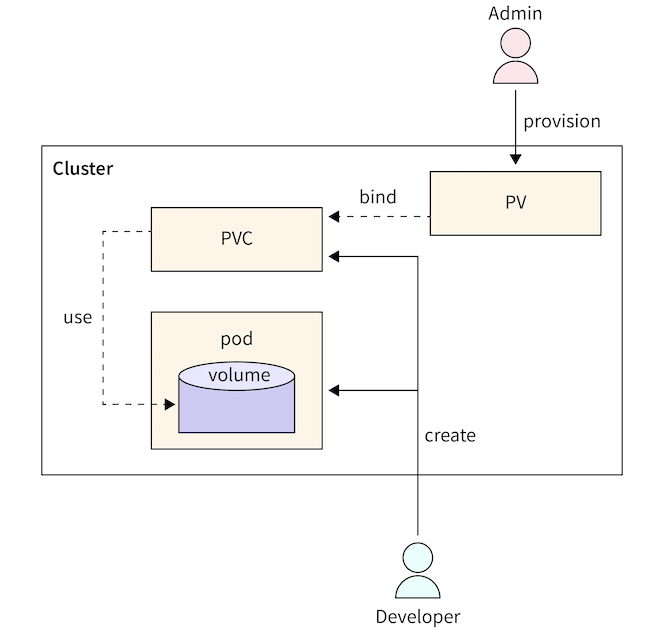
PersistentVolume(持久卷)子系统为用户和管理员提供了一套 API,将存储的提供方式存储的使用方式解耦。为实现这一目标,我们引入了两种新的 API 资源:PersistentVolume(PV)PersistentVolumeClaim(PVC)

  • PersistentVolume(PV) 是集群中的一块存储资源,可由管理员预先配置,也可通过 StorageClass(存储类) 动态创建。PV 是集群中的一种资源,就像节点(Node)一样。PV 与普通卷(Volume)类似,都是基于卷插件实现的,但其生命周期独立于任何使用它的 Pod。PV 对象封装了存储的具体实现细节,无论是 NFS、iSCSI,还是云服务商提供的特定存储系统。
  • PersistentVolumeClaim(PVC) 是用户对存储资源的请求。它的作用类似于 Pod:Pod 消耗节点的计算资源(如 CPU 和内存),而 PVC 消耗 PV 存储资源。正如 Pod 可以请求特定数量的 CPU 和内存一样,PVC 也可以请求特定的存储容量访问模式(例如:ReadWriteOnceReadOnlyManyReadWriteManyReadWriteOncePod,详见 AccessModes)。

如下是PersistentVolume的源码结构定义:

1
2
3
4
5
6
7
8
9
10
11
12
13
14
15
16
17
18
19
20
21
22
23
24
25
26
27
28
29
30
31
32
33
34
35
36
37
38
39
40
41
42
43
44
// https://github.com/kubernetes/kubernetes/blob/release-1.34/staging/src/k8s.io/api/core/v1/types.go

// PersistentVolume (PV) is a storage resource provisioned by an administrator.
// It is analogous to a node.
// More info: https://kubernetes.io/docs/concepts/storage/persistent-volumes
type PersistentVolume struct {
metav1.TypeMeta `json:",inline"`

metav1.ObjectMeta `json:"metadata,omitempty" protobuf:"bytes,1,opt,name=metadata"`

// spec defines a specification of a persistent volume owned by the cluster.
// Provisioned by an administrator.
Spec PersistentVolumeSpec `json:"spec,omitempty" protobuf:"bytes,2,opt,name=spec"`

// status represents the current information/status for the persistent volume.
// Populated by the system.
Status PersistentVolumeStatus `json:"status,omitempty" protobuf:"bytes,3,opt,name=status"`
}

// PersistentVolumeSpec is the specification of a persistent volume.
type PersistentVolumeSpec struct {
// capacity is the description of the persistent volume's resources and capacity.
Capacity ResourceList `json:"capacity,omitempty" protobuf:"bytes,1,rep,name=capacity,casttype=ResourceList,castkey=ResourceName"`
// persistentVolumeSource is the actual volume backing the persistent volume.
PersistentVolumeSource `json:",inline" protobuf:"bytes,2,opt,name=persistentVolumeSource"`
// accessModes contains all ways the volume can be mounted.
AccessModes []PersistentVolumeAccessMode `json:"accessModes,omitempty" protobuf:"bytes,3,rep,name=accessModes,casttype=PersistentVolumeAccessMode"`
// claimRef is part of a bi-directional binding between PersistentVolume and PersistentVolumeClaim.
// Expected to be non-nil when bound.
// claim.VolumeName is the authoritative bind between PV and PVC.
ClaimRef *ObjectReference `json:"claimRef,omitempty" protobuf:"bytes,4,opt,name=claimRef"`
// persistentVolumeReclaimPolicy defines what happens to a persistent volume when released from its claim.
PersistentVolumeReclaimPolicy PersistentVolumeReclaimPolicy `json:"persistentVolumeReclaimPolicy,omitempty" protobuf:"bytes,5,opt,name=persistentVolumeReclaimPolicy,casttype=PersistentVolumeReclaimPolicy"`
// storageClassName is the name of StorageClass to which this persistent volume belongs. Empty value
// means that this volume does not belong to any StorageClass.
// +optional
StorageClassName string `json:"storageClassName,omitempty" protobuf:"bytes,6,opt,name=storageClassName"`
MountOptions []string `json:"mountOptions,omitempty" protobuf:"bytes,7,opt,name=mountOptions"`
VolumeMode *PersistentVolumeMode `json:"volumeMode,omitempty" protobuf:"bytes,8,opt,name=volumeMode,casttype=PersistentVolumeMode"`
NodeAffinity *VolumeNodeAffinity `json:"nodeAffinity,omitempty" protobuf:"bytes,9,opt,name=nodeAffinity"`
// Name of VolumeAttributesClass to which this persistent volume belongs. Empty value
// is not allowed. When this field is not set, it indicates that this volume does not belong to any VolumeAttributesClass.
VolumeAttributesClassName *string `json:"volumeAttributesClassName,omitempty" protobuf:"bytes,10,opt,name=volumeAttributesClassName"`
}

Static & Dynamic

Kubernetes 中针对持久卷(Persistent Volume, PV)有两种供应方式:静态供应(Static Provisioning)与动态供应(Dynamic Provisioning)。

  • 静态(Static)
    集群管理员会创建若干个持久卷(Persistent Volumes,PV)。这些 PV 包含了真实存储的详细信息,可供集群用户使用。它们存在于 Kubernetes API 中,并可供用户声明(PersistentVolumeClaim,PVC)绑定和使用。

  • 动态(Dynamic)
    当管理员创建的所有静态 PV 都无法匹配用户的 PersistentVolumeClaim(PVC)时,集群可能会尝试为该 PVC 动态创建一个卷。这种动态创建基于存储类(StorageClass):PVC 必须明确请求某个存储类,并且管理员必须已创建并正确配置了该存储类,才能实现动态卷供应。如果 PVC 请求的存储类名称为 “”(空字符串),则表示该 PVC 主动禁用动态供应。

Binding

用户创建一个 PersistentVolumeClaim(PVC),指定所需的存储容量和特定的访问模式。控制平面中的一个控制循环会持续监控新创建的 PVC,尝试为其找到一个匹配的持久卷(PV)(如果存在),并将二者绑定在一起。

如果该 PVC 触发了动态供应,并因此创建了一个新的 PV,那么该控制循环一定会将这个新创建的 PV 绑定到该 PVC 上。

在静态供应的情况下,用户最终获得的存储容量至少等于其请求量,但实际分配的 PV 容量可能大于所请求的容量。

一旦绑定完成,PVC 与 PV 之间的绑定关系就是排他性的(exclusive)——无论该绑定是通过静态还是动态方式建立的。PVC 与 PV 的绑定是一对一的映射,通过一个名为 ClaimRef 的引用实现,该引用在 PV 和 PVC 之间建立双向绑定

如果当前集群中不存在与某个 PVC 匹配的 PV,该 PVC 将无限期保持未绑定状态。一旦有匹配的 PV 被添加到集群中,该 PVC 就会自动与其绑定。例如,如果集群中只有多个 50Gi 的 PV,那么一个请求 100Gi 的 PVC 就无法被绑定;但当管理员或动态供应机制向集群加入一个 100Gi 的 PV 后,该 PVC 就会立即被绑定。

下图引用Kubernetes PVC,很好的解释了PV和PVC的设计:
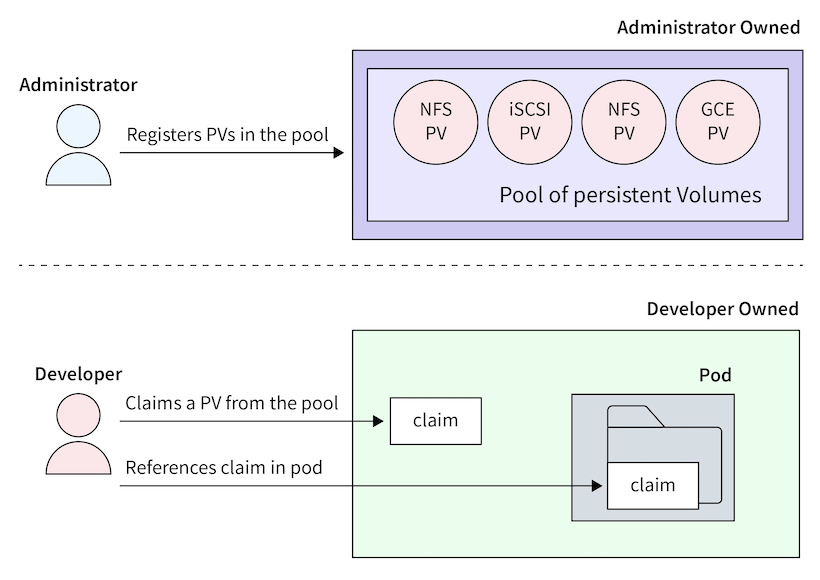
如下是通过Static的方式,集群中先创建PV对象:

1
2
3
4
5
6
7
8
9
10
11
12
13
14
15
# pv-nfs.yaml
apiVersion: v1
kind: PersistentVolume
meta
name: pv-nfs-data
spec:
capacity:
storage: 10Gi
accessModes:
- ReadWriteMany # NFS 支持多读写
persistentVolumeReclaimPolicy: Retain # 删除 PVC 后保留数据
nfs:
server: nfs.example.com
path: "/exports/data"
readOnly: false

然后通过PVC创建当前Namespace的PV分配资源:

1
2
3
4
5
6
7
8
9
10
11
12
13
# pvc-nfs.yaml
apiVersion: v1
kind: PersistentVolumeClaim
meta
name: pvc-nfs-claim
spec:
accessModes:
- ReadWriteMany
resources:
requests:
storage: 5Gi # 请求 5Gi(≤ PV 的 10Gi)
# 注意:这里不指定 storageClassName!
# 或者:storageClassName: ""

最后在Pod中使用PVC来进行Volume的挂载:

1
2
3
4
5
6
7
8
9
10
11
12
13
14
15
16
# pod-nfs.yaml
apiVersion: v1
kind: Pod
meta
name: nginx-nfs
spec:
containers:
- name: nginx
image: nginx
volumeMounts:
- name: shared-data
mountPath: /usr/share/nginx/html
volumes:
- name: shared-data
persistentVolumeClaim:
claimName: pvc-nfs-claim

Access Mode

  • ReadWriteOnce (RWO):单节点读写(最常见,如云硬盘)
  • ReadOnlyMany (ROX):多节点只读(如共享配置)
  • ReadWriteMany (RWX):多节点读写(如 NFS、EFS)
  • ReadWriteOncePod (RWOP)(K8s 1.29+):单 Pod 读写(即使跨节点迁移,也确保同一时间只有一个 Pod 访问)

⚠️ 注意:能否多 Pod 共享,既要看 PVC 声明的模式,也要看底层存储是否支持

如下是源码的定义:

1
2
3
4
5
6
7
8
9
10
11
12
13
14
15
16
// https://github.com/kubernetes/kubernetes/blob/release-1.34/staging/src/k8s.io/api/core/v1/types.go

// +enum
type PersistentVolumeAccessMode string

const (
// can be mounted in read/write mode to exactly 1 host
ReadWriteOnce PersistentVolumeAccessMode = "ReadWriteOnce"
// can be mounted in read-only mode to many hosts
ReadOnlyMany PersistentVolumeAccessMode = "ReadOnlyMany"
// can be mounted in read/write mode to many hosts
ReadWriteMany PersistentVolumeAccessMode = "ReadWriteMany"
// can be mounted in read/write mode to exactly 1 pod
// cannot be used in combination with other access modes
ReadWriteOncePod PersistentVolumeAccessMode = "ReadWriteOncePod"
)

Reclaiming

当用户不再需要其存储卷时,可以删除 API 中的 PersistentVolumeClaim(PVC)对象,从而触发资源的回收流程。PersistentVolume(PV)的 回收策略(reclaim policy) 告诉集群:当该卷被释放(即对应的 PVC 被删除)后,应该如何处理该卷。目前,PV 的回收策略可以是以下三种之一:Retain(保留)Recycle(回收)Delete(删除)

  • Retain(保留)

Retain策略允许手动回收资源。当 PVC 被删除后,对应的 PV 仍然存在,并且该卷状态变为 “released”(已释放)。但此时它还不能被其他 PVC 使用,因为原用户的数据仍保留在卷上。

管理员可以通过以下步骤手动回收该卷:

  1. 删除该 PersistentVolume 对象(PV 在 Kubernetes 中被移除);
  2. 手动清理外部存储系统(如云盘、NFS 服务器等)上该存储资产中的数据;
  3. 手动删除外部存储系统中的该存储资产(可选);
  4. 如果希望复用同一存储资产,可以创建一个新的 PV,其配置指向同一个底层存储资源。
  • Delete(删除)

对于支持 Delete回收策略的存储插件,删除操作会同时移除

  • Kubernetes 中的 PersistentVolume 对象;
  • 以及外部基础设施中对应的底层存储资产(例如 AWS EBS 卷、GCE PD、Azure Disk 等)。

通过动态供应创建的卷会自动继承其 StorageClass 的回收策略,而 StorageClass 的默认回收策略通常为 Delete。因此,集群管理员应根据用户预期提前配置好 StorageClass 的 reclaimPolicy。否则,就需要在 PV 创建后手动编辑或打补丁(patch)来修改其回收策略(参见:Change the Reclaim Policy of a PersistentVolume)。

  • Recycle(回收)

⚠️ :“Recycle” 回收策略已被弃用(deprecated)。推荐的做法是使用动态供应(dynamic provisioning)

如果底层卷插件支持 “Recycle” 策略,它会对卷执行一次基础的数据清理(例如执行 rm -rf /thevolume/*),然后将该卷标记为可用,供新的 PVC 绑定。但由于该机制存在安全性和可靠性问题,Kubernetes 官方已不再维护,强烈建议避免使用

如下是源码定义:

1
2
3
4
5
6
7
8
9
10
11
12
13
14
15
16
17
// https://github.com/kubernetes/kubernetes/blob/release-1.34/staging/src/k8s.io/api/core/v1/types.go

// PersistentVolumeReclaimPolicy describes a policy for end-of-life maintenance of persistent volumes.
// +enum
type PersistentVolumeReclaimPolicy string

const (
// PersistentVolumeReclaimRecycle means the volume will be recycled back into the pool of unbound persistent volumes on release from its claim.
// The volume plugin must support Recycling.
PersistentVolumeReclaimRecycle PersistentVolumeReclaimPolicy = "Recycle"
// PersistentVolumeReclaimDelete means the volume will be deleted from Kubernetes on release from its claim.
// The volume plugin must support Deletion.
PersistentVolumeReclaimDelete PersistentVolumeReclaimPolicy = "Delete"
// PersistentVolumeReclaimRetain means the volume will be left in its current phase (Released) for manual reclamation by the administrator.
// The default policy is Retain.
PersistentVolumeReclaimRetain PersistentVolumeReclaimPolicy = "Retain"
)

PersistentVolume Source

持久卷(PersistentVolume,PV)类型通过插件方式实现。Kubernetes 目前支持以下插件:

  • csi:容器存储接口(Container Storage Interface,CSI)
  • fc:光纤通道(Fibre Channel,FC)存储
  • hostPath:HostPath 卷(仅用于单节点测试;在多节点集群中无法正常工作;建议改用 local 卷)
  • iscsi:iSCSI(基于 IP 的 SCSI)存储
  • local:挂载在节点上的本地存储设备
  • nfs:网络文件系统(Network File System,NFS)存储

以下类型的 PersistentVolume 已被弃用(deprecated)但仍然可用除非您使用的是 flexVolumecephfsrbd,否则请安装对应的 CSI 驱动程序

  • awsElasticBlockStore:AWS Elastic Block Store(EBS)(从 v1.23 起默认启用迁移)
  • azureDisk:Azure 磁盘(从 v1.23 起默认启用迁移)
  • azureFile:Azure 文件(从 v1.24 起默认启用迁移)
  • cinder:Cinder(OpenStack 块存储)(从 v1.21 起默认启用迁移)
  • flexVolume:FlexVolume(从 v1.23 起弃用,无迁移计划,也无移除支持的计划
  • gcePersistentDisk:GCE 持久磁盘(从 v1.23 起默认启用迁移)
  • portworxVolume:Portworx 卷(从 v1.31 起默认启用迁移)
  • vsphereVolume:vSphere VMDK 卷(从 v1.25 起默认启用迁移)

旧版本 Kubernetes 还曾支持以下“内建(in-tree)”的 PersistentVolume 类型,但已在后续版本中彻底移除

  • cephfs(从 v1.31 起不再可用)
  • flocker:Flocker 存储(从 v1.25 起不再可用)
  • glusterfs:GlusterFS 存储(从 v1.26 起不再可用)
  • photonPersistentDisk:Photon 控制器持久磁盘(从 v1.15 起不再可用)
  • quobyte:Quobyte 卷(从 v1.25 起不再可用)
  • rbd:Rados 块设备(RBD)卷(从 v1.31 起不再可用)
  • scaleIO:ScaleIO 卷(从 v1.21 起不再可用)
  • storageos:StorageOS 卷(从 v1.25 起不再可用)

Kubernetes 最初将所有存储驱动代码直接编译进核心代码库(称为 “in-tree” 驱动)。这种方式带来诸多问题:

  • 核心代码臃肿;
  • 存储厂商更新需等待 Kubernetes 发布周期;
  • 安全和稳定性风险高。

为解决这些问题,Kubernetes 引入了 CSI(Container Storage Interface)标准,允许存储厂商以独立插件形式提供驱动,无需修改 Kubernetes 核心代码。

因此,社区启动了 “in-tree 驱动迁移到 CSI” 的长期计划。

这些是仍被官方支持且推荐使用的类型:

  • csi唯一推荐的现代存储扩展方式。所有新存储集成都应通过 CSI 实现。
  • **fciscsinfslocal**:属于基础、通用协议,Kubernetes 仍保留其 in-tree 支持,但未来也可能逐步迁移或仅维护。
  • hostPath:仅用于单节点开发/测试(如 Minikube),绝不能用于生产多节点集群,因为数据只存在于某一个节点上,Pod 调度到其他节点将无法访问。

✅ 建议:生产环境应优先使用 csi + 对应云厂商或存储系统的 CSI 驱动。

Storage Classes(存储类)

StorageClass 为集群管理员提供了一种方式,用于描述其所提供的存储类型(或“类别”)。不同的存储类可能对应不同的服务质量(QoS)等级、备份策略,或由集群管理员定义的任意策略。Kubernetes 本身不对“存储类”代表什么做任何假设或限制

StorageClass 对象的名称具有实际意义,用户正是通过这个名称来请求特定的存储类。管理员在首次创建 StorageClass 对象时,会设定其名称及其他参数。

前面在PV一章节中我们知道,Kubernetes 中针对持久卷(Persistent Volume, PV)有两种供应方式:静态供应(Static Provisioning)与动态供应(Dynamic Provisioning)。这里StorageClass就是提供Dynamic Provision的实现方式。相对于静态PV的使用,StorageClass实现了:

  • 用户只需声明“我要什么”(通过 PVC 指定 StorageClass 名称);
  • Kubernetes 自动创建 PV(调用 provisioner);
  • 完全按需分配,零闲置,弹性伸缩;

作为管理员,你可以指定一个默认的 StorageClass,用于处理那些未明确请求特定存储类的 PVC。更多细节:PersistentVolumeClaim concept.

StorageClass的结构定义如下:

1
2
3
4
5
6
7
8
9
10
11
12
13
14
15
16
17
18
19
20
21
22
23
24
25
26
27
28
29
30
31
32
33
34
35
36
37
38
39
40
41
42
43
44
45
46
47
48
49
50
51
52
53
54
https://github.com/kubernetes/kubernetes/blob/release-1.34/staging/src/k8s.io/api/storage/v1/types.go

// StorageClasses are non-namespaced; the name of the storage class
// according to etcd is in ObjectMeta.Name.
type StorageClass struct {
metav1.TypeMeta `json:",inline"`

metav1.ObjectMeta `json:"metadata,omitempty" protobuf:"bytes,1,opt,name=metadata"`

// provisioner indicates the type of the provisioner.
Provisioner string `json:"provisioner" protobuf:"bytes,2,opt,name=provisioner"`

// parameters holds the parameters for the provisioner that should
// create volumes of this storage class.
Parameters map[string]string `json:"parameters,omitempty" protobuf:"bytes,3,rep,name=parameters"`

// reclaimPolicy controls the reclaimPolicy for dynamically provisioned PersistentVolumes of this storage class.
// Defaults to Delete.
ReclaimPolicy *v1.PersistentVolumeReclaimPolicy `json:"reclaimPolicy,omitempty" protobuf:"bytes,4,opt,name=reclaimPolicy,casttype=k8s.io/api/core/v1.PersistentVolumeReclaimPolicy"`

// mountOptions controls the mountOptions for dynamically provisioned PersistentVolumes of this storage class.
// e.g. ["ro", "soft"]. Not validated -
// mount of the PVs will simply fail if one is invalid.
MountOptions []string `json:"mountOptions,omitempty" protobuf:"bytes,5,opt,name=mountOptions"`

// allowVolumeExpansion shows whether the storage class allow volume expand.
AllowVolumeExpansion *bool `json:"allowVolumeExpansion,omitempty" protobuf:"varint,6,opt,name=allowVolumeExpansion"`

// volumeBindingMode indicates how PersistentVolumeClaims should be
// provisioned and bound. When unset, VolumeBindingImmediate is used.
// This field is only honored by servers that enable the VolumeScheduling feature.
VolumeBindingMode *VolumeBindingMode `json:"volumeBindingMode,omitempty" protobuf:"bytes,7,opt,name=volumeBindingMode"`

// allowedTopologies restrict the node topologies where volumes can be dynamically provisioned.
// Each volume plugin defines its own supported topology specifications.
// An empty TopologySelectorTerm list means there is no topology restriction.
// This field is only honored by servers that enable the VolumeScheduling feature.
AllowedTopologies []v1.TopologySelectorTerm `json:"allowedTopologies,omitempty" protobuf:"bytes,8,rep,name=allowedTopologies"`
}


type VolumeBindingMode string

const (
// VolumeBindingImmediate indicates that PersistentVolumeClaims should be
// immediately provisioned and bound. This is the default mode.
VolumeBindingImmediate VolumeBindingMode = "Immediate"

// VolumeBindingWaitForFirstConsumer indicates that PersistentVolumeClaims
// should not be provisioned and bound until the first Pod is created that
// references the PeristentVolumeClaim. The volume provisioning and
// binding will occur during Pod scheduing.
VolumeBindingWaitForFirstConsumer VolumeBindingMode = "WaitForFirstConsumer"
)

每个 StorageClass 对象的关键字段主要包括:

  • provisioner:指定使用哪个卷插件来创建 PV

  • parameters:传递给 provisioner 的参数

  • reclaimPolicy:PV 的回收策略(Delete 或 Retain)

  • allowVolumeExpansion:是否允许扩容

  • volumeBindingMode

    • Immediate:PVC 创建时立即绑定和供应
    • WaitForFirstConsumer:延迟绑定,直到 Pod 被调度

如下是StroageClass示例,运行在 AWS EKS,已安装 Amazon EBS CSI Driver

1
2
3
4
5
6
7
8
9
10
11
12
13
# sc-ebs.yaml
apiVersion: storage.k8s.io/v1
kind: StorageClass
meta
name: ebs-gp3-encrypted
provisioner: ebs.csi.aws.com
volumeBindingMode: WaitForFirstConsumer # 延迟到 Pod 调度时创建
allowVolumeExpansion: true
parameters:
type: gp3
encrypted: "true"
fsType: ext4
reclaimPolicy: Delete

创建 PVC,引用 StorageClass

1
2
3
4
5
6
7
8
9
10
11
12
# pvc-ebs.yaml
apiVersion: v1
kind: PersistentVolumeClaim
meta
name: pvc-ebs-app
spec:
accessModes:
- ReadWriteOnce # EBS 只支持 RWO
resources:
requests:
storage: 20Gi
storageClassName: ebs-gp3-encrypted # 关键!引用 SC

创建Pod,触发动态PV的创建和绑定:

1
2
3
4
5
6
7
8
9
10
11
12
13
14
15
16
17
18
19
# pod-ebs.yaml
apiVersion: v1
kind: Pod
meta
name: app-ebs
spec:
containers:
- name: app
image: ubuntu
command: ["/bin/sh", "-c"]
args: ["sleep infinity"]
volumeMounts:
- name: data
mountPath: /data
volumes:
- name: data
persistentVolumeClaim:
claimName: pvc-ebs-app

设置默认 StorageClass

1
2
3
4
5
6
7
8
9
apiVersion: storage.k8s.io/v1
kind: StorageClass
metadata:
name: standard
annotations:
storageclass.kubernetes.io/is-default-class: "true"
provisioner: kubernetes.io/gce-pd
parameters:
type: pd-standard

常见云厂商的 StorageClass

AWS EBS:

1
2
3
4
5
6
7
8
apiVersion: storage.k8s.io/v1
kind: StorageClass
metadata:
name: aws-ebs
provisioner: ebs.csi.aws.com
parameters:
type: gp3
encrypted: "true"

GCP Persistent Disk:

1
2
3
4
5
6
7
8
apiVersion: storage.k8s.io/v1
kind: StorageClass
metadata:
name: gcp-pd
provisioner: pd.csi.storage.gke.io
parameters:
type: pd-balanced
replication-type: regional-pd

Azure Disk:

1
2
3
4
5
6
7
8
apiVersion: storage.k8s.io/v1
kind: StorageClass
metadata:
name: azure-disk
provisioner: disk.csi.azure.com
parameters:
skuName: Premium_LRS
kind: Managed

下图引用,显示了静态PV和动态StorageClass的设计上的差异:

让Claude帮我生成了,静态 PV和动态 StorageClass的差异对比如下:

对比维度 静态 PV 动态 StorageClass 详细说明
工作原理 管理员预先手动创建一批 PV 放在”池子”里,用户创建 PVC 时从池子里挑选匹配的 管理员只需定义存储的”配方”,用户创建 PVC 时系统自动”生产”新的 PV 类比:PV=仓库现货,SC=生产线
PV与PVC绑定关系 一对一,第一个 PVC 绑定后整个 PV 被独占,即使只用了一部分容量 一对一,但 PV 是按 PVC 请求的精确大小创建的,没有浪费 关键:两者都是 1:1 绑定,但 SC 不浪费
资源浪费问题 严重:PVC 请求 10Gi 可能绑定到 50Gi 的 PV,浪费 40Gi;预创建的 PV 没人用也占用资源 几乎没有:请求多少创建多少,不用不创建 PV 可能浪费 30-50% 的存储
管理 100 个应用的工作量 需要写 100 个 PV 的 YAML 文件,每个都要指定不同的名字、路径、后端存储位置等,然后逐个 kubectl apply 只需写 1 个 StorageClass 的 YAML,用户自己创建 PVC,系统自动生成 100 个 PV 工作量差异:100 倍
PV 用尽时的处理 用户创建 PVC 后一直 Pending,管理员收到告警,登录服务器手动创建新 PV,通常需要 10-30 分钟人工介入 自动创建新 PV,通常 30 秒-2 分钟完成,无需人工 响应速度差异:分钟级 vs 秒级
容量精确度 不精确:你创建 10Gi、20Gi、50Gi 的 PV,但用户可能需要 15Gi,只能用 20Gi 的(浪费 5Gi) 精确:用户要 15Gi 就创建 15Gi 资源匹配度:SC 接近 100%
跨可用区问题 手动处理:你必须为每个可用区创建 PV,且要确保 Pod 调度到正确的区域,容易出错 自动处理:设置 WaitForFirstConsumer 后,系统确保 PV 在 Pod 所在的可用区创建 AWS EBS 等场景下 PV 方式极易出错

Volume Attributes Classes(卷属性类)

VolumeAttributesClass 是 Kubernetes 1.29+ 引入的特性,允许在运行时修改 PV 的属性,而无需重新创建卷。

Volume Attributes Classes 是一个相对较新的功能,在 Kubernetes v1.34 中默认开启。该功能旨在解耦存储类(StorageClass)中与驱动特定属性的绑定,使用户能够更灵活地定义存储卷的行为特性,而无需为每种属性组合创建多个 StorageClass。

在 Volume Attributes Classes 引入之前,Kubernetes 使用 StorageClass 来定义动态配置的存储参数(比如 type: ssdiopsPerGB: "10" 等)。这些参数是通过 parameters 字段传递给 CSI(Container Storage Interface)驱动的。

这里存在的问题在于:

  • 每当用户需要一种新的存储参数组合(如不同的 IOPS、吞吐量、加密策略等),就必须创建一个新的 StorageClass。
  • 这导致 StorageClass 数量爆炸式增长,难以管理。
  • 存储管理员和应用开发者职责耦合严重。

为了解决这个问题,Kubernetes 引入了 VolumeAttributesClass(简称 VAC),将“存储后端能力”(由 StorageClass 定义)与“卷的具体属性”(由 VolumeAttributesClass 定义)分离。

VolumeAttributesClass 是一种新的 Kubernetes API 资源,用于定义一组传递给 CSI 驱动的卷属性(volume attributes)。这些属性原本是写在 StorageClass 的 parameters 中的,现在可以单独提取出来。

1
2
3
4
5
6
7
8
9
apiVersion: storage.k8s.io/v1alpha1
kind: VolumeAttributesClass
metadata:
name: fast-ssd-with-encryption
driverName: ebs.csi.aws.com
parameters:
type: io2
encrypted: "true"
iops: "10000"

在 PersistentVolumeClaim (PVC) 中,你可以通过 volumeAttributesClassName 字段引用一个 VolumeAttributesClass:

1
2
3
4
5
6
7
8
9
10
11
12
apiVersion: v1
kind: PersistentVolumeClaim
metadata:
name: my-pvc
spec:
accessModes:
- ReadWriteOnce
resources:
requests:
storage: 100Gi
storageClassName: my-storage-class # 指定底层存储类型
volumeAttributesClassName: fast-ssd-with-encryption # 指定卷属性

这样拆分组合后:

  • storageClassName:决定使用哪个 CSI 驱动和底层存储池(如 AWS EBS、GCP PD 等)。
  • volumeAttributesClassName:决定该卷的具体配置(如IOPS、加密、备份策略等)。

这样,同一个 StorageClass 可以配合多个 VolumeAttributesClass 使用,极大提升了灵活性。

  • 解耦:存储基础设施(StorageClass)与应用需求(VolumeAttributesClass)分离。
  • 复用性:一个 StorageClass 可被多个不同属性的卷复用。
  • 简化管理:减少 StorageClass 的数量,提升可维护性。
  • 权限控制:可对 VolumeAttributesClass 设置 RBAC,让开发者只能使用预定义的属性组合,而不能随意指定底层参数。

二者配合使用,实现“基础设施与策略分离”的现代云原生理念。


Dynamic Volume Provisioning(动态卷供应)

动态卷供应允许按需自动创建存储卷,无需管理员预先配置。动态卷制备的实现基于 storage.k8s.io API 组中的 StorageClass API 对象。

这种设计确保了终端用户无需关心存储是如何创建的复杂细节,同时仍能从多个存储选项中进行选择。

在 Kubernetes 中,动态卷制备(Dynamic Volume Provisioning) 是一种自动化机制:

当用户创建一个 PersistentVolumeClaim(PVC),而系统中没有现成的 PersistentVolume(PV) 与之匹配时,Kubernetes 会根据 PVC 所指定的 StorageClass自动调用对应的存储插件(provisioner),在底层存储系统(如 AWS EBS、GCP PD、Ceph、NFS 等)中创建一个新的存储卷,并自动生成一个对应的 PV 对象,将其绑定到该 PVC。

整个过程完全无需人工干预。动态制备的核心表达其实就是Storage Class中的制备器(provisioner),用于创建存储卷,以及在制备时传递给该插件的一组参数。如下是不同云厂商的制备器及相关参数:

AWS EBS:

1
2
3
4
5
6
7
8
apiVersion: storage.k8s.io/v1
kind: StorageClass
metadata:
name: aws-ebs
provisioner: ebs.csi.aws.com
parameters:
type: gp3
encrypted: "true"

GCP Persistent Disk:

1
2
3
4
5
6
7
8
apiVersion: storage.k8s.io/v1
kind: StorageClass
metadata:
name: gcp-pd
provisioner: pd.csi.storage.gke.io
parameters:
type: pd-balanced
replication-type: regional-pd

动态制备这里,也正好可以解释,为什么需要 CSI?在 CSI 出现之前,Kubernetes 内置了各种云存储的代码(in-tree 插件),导致:

  • 代码臃肿;
  • 云厂商更新慢;
  • 安全风险高。

CSI 把存储逻辑完全外置,Kubernetes 只需实现标准接口,存储厂商自己维护插件。这就是为什么你现在看到的都是 ebs.csi.aws.com,而不是旧的 kubernetes.io/aws-ebs。制备的流程如下:

  1. 你写 PVC → 触发动态制备;
  2. Kubernetes 控制器调用 CSI Controller在云平台创建实际存储卷(买盘);
  3. Kubernetes 自动生成 PV 并绑定到 PVC(绑定);
  4. Pod 调度后,kubelet 调用 CSI Node Plugin将云盘挂载到节点并注入容器(插盘)。

🌟 所有这一切,你只需要写一个 PVC。剩下的,Kubernetes + CSI 插件全自动完成。这就是云原生存储的魔力!✨

Volume Snapshots(卷快照)

在 Kubernetes 中,VolumeSnapshot 表示存储系统中某个卷在某一时刻的快照(snapshot)。

PersistentVolume(PV)和 PersistentVolumeClaim(PVC)用于为用户和管理员提供卷的方式类似,Kubernetes 也提供了 VolumeSnapshotContentVolumeSnapshot 这两个 API 资源,用于为用户和管理员创建卷的快照。

  • VolumeSnapshotContent 是由管理员在集群中从某个卷创建的快照。它是一个集群级别的资源,类似于 PersistentVolume。
  • VolumeSnapshot 是用户发起的对某个卷创建快照的请求,其作用类似于 PersistentVolumeClaim。

此外,VolumeSnapshotClass 允许你为快照指定不同的属性。这些属性可能因同一存储系统上对同一卷创建的不同快照而异,因此无法通过 PVC 所使用的 StorageClass 来表达。

卷快照为 Kubernetes 用户提供了一种标准化的方式,可以在不创建全新卷的前提下,复制某个卷在特定时间点的内容。例如,数据库管理员可以在执行编辑或删除操作之前,使用快照功能备份数据库。

使用卷快照时需要注意的关键点:

  1. VolumeSnapshot、VolumeSnapshotContent 和 VolumeSnapshotClass 是自定义资源(CRDs),不属于 Kubernetes 核心 API。
    • 换句话说,这些资源需要额外安装才能使用,不是 Kubernetes 默认就有的。
  2. 卷快照功能仅支持 CSI(Container Storage Interface)驱动。
    • 传统的 in-tree(内置)存储插件不支持快照功能。只有实现了 CSI 接口的存储驱动才可能支持快照。
  3. 部署卷快照功能需要两个关键组件:
    • 快照控制器(Snapshot Controller):部署在控制平面(control plane)中,负责监听 VolumeSnapshot 和 VolumeSnapshotContent 对象,并管理 VolumeSnapshotContent 的创建与删除。
    • csi-snapshotter(Sidecar 容器):与 CSI 驱动一起部署,监听 VolumeSnapshotContent 对象,并通过 CSI 接口调用底层存储系统的 CreateSnapshotDeleteSnapshot 操作。
  4. 存在一个验证 Webhook 服务器(Validating Webhook Server)
    • 用于对快照对象进行更严格的合法性校验。
    • 该 Webhook 应由 Kubernetes 发行版(如 RKE、OpenShift、EKS 等)负责安装,与快照控制器和 CRD 一起部署,而不是由 CSI 驱动提供
    • 所有启用快照功能的 Kubernetes 集群都应安装此 Webhook。
  5. 并非所有 CSI 驱动都实现了快照功能。
    • 只有那些明确支持卷快照的 CSI 驱动才会使用 csi-snapshotter
    • 用户应查阅具体 CSI 驱动的文档,确认其是否支持快照。
  6. CRD 和快照控制器的安装由 Kubernetes 发行版负责。
    • 作为用户,通常不需要手动安装这些组件,但需确保集群管理员已正确部署。
  7. 高级用例:多卷组快照(Group Snapshots)
    • 如果你需要对多个卷同时创建快照(例如保证数据库和日志卷的一致性),可以参考 external CSI Volume Group Snapshot 项目文档。

关键概念解释:

概念 类比对象 作用 谁创建/管理
VolumeSnapshot PVC 用户说:“我要给这个卷拍个快照” 用户(通过 YAML 声明)
VolumeSnapshotContent PV 实际的快照资源,代表存储后端真正创建出来的快照 由 snapshot controller 自动创建
VolumeSnapshotClass StorageClass 定义快照的策略(例如:每天保留几个、是否增量、删除策略等) 管理员预先创建
snapshot controller PV Controller 负责把用户的 VolumeSnapshot 请求转成真正的 VolumeSnapshotContent 集群管理员部署
csi-snapshotter csi-provisioner 侧车容器,真正去调用存储后端的快照接口 与 CSI 驱动一起部署

如下示例,创建 VolumeSnapshotClass:

1
2
3
4
5
6
apiVersion: snapshot.storage.k8s.io/v1
kind: VolumeSnapshotClass
metadata:
name: csi-snapclass
driver: hostpath.csi.k8s.io
deletionPolicy: Delete

创建快照:

1
2
3
4
5
6
7
8
apiVersion: snapshot.storage.k8s.io/v1
kind: VolumeSnapshot
metadata:
name: my-snapshot
spec:
volumeSnapshotClassName: csi-snapclass
source:
persistentVolumeClaimName: my-pvc

从快照恢复:

1
2
3
4
5
6
7
8
9
10
11
12
13
14
15
apiVersion: v1
kind: PersistentVolumeClaim
metadata:
name: restored-pvc
spec:
accessModes:
- ReadWriteOnce
storageClassName: standard
resources:
requests:
storage: 10Gi
dataSource:
name: my-snapshot
kind: VolumeSnapshot
apiGroup: snapshot.storage.k8s.io

CSI Volume Cloning(CSI 卷克隆)

卷克隆是指基于一个已有的 PVC(PersistentVolumeClaim),创建一个新的 PVC,其底层 PV(PersistentVolume)包含与源卷完全相同的数据副本

  • 克隆操作是存储系统原生支持的(由 CSI 驱动调用存储后端的克隆 API)。
  • 克隆不是快照(Snapshot),但通常底层依赖快照机制实现。
  • 克隆完成后,新卷与源卷完全独立:修改新卷不会影响源卷,反之亦然。

如下是克隆卷的使用:

1
2
3
4
5
6
7
8
9
10
11
12
13
14
apiVersion: v1
kind: PersistentVolumeClaim
metadata:
name: cloned-pvc
spec:
accessModes:
- ReadWriteOnce
storageClassName: standard
resources:
requests:
storage: 10Gi
dataSource:
name: source-pvc
kind: PersistentVolumeClaim

如下是Volume Cloning和Volume Snapshot的差异对比:

特性 Volume Cloning Volume Snapshot
目的 快速创建一个可读写的新卷 创建一个只读的时间点副本(用于备份/恢复)
是否可直接使用 ✅ 可直接挂载为 PVC ❌ 不能挂载,需通过它创建新 PVC
数据独立性 ✅ 完全独立 ❌ 快照本身不可写
底层实现 可能使用快照,也可能使用存储系统的克隆 API 依赖存储系统的快照功能
用户操作 直接在 PVC 的 dataSource 中引用另一个 PVC 先创建 VolumeSnapshot,再用它创建 PVC